

  |
- Buy Incomedia WebSite X5 Evolution directly from the developer (with a -20% discount).
- Buy Incomedia WebSite X5 Professional directly from the developer (with a -20% discount).
Video lesson
- RSS Feed – 00:00:36.
- Accordion Text – 00:05:10.
- Flip Clock – 00:07:18.
- Audio Player – 00:09:21.
Videos look better with 720 HD quality. This and other video tutorials can be found on YouTube and Vimeo.
The lesson includes such paid objects as:
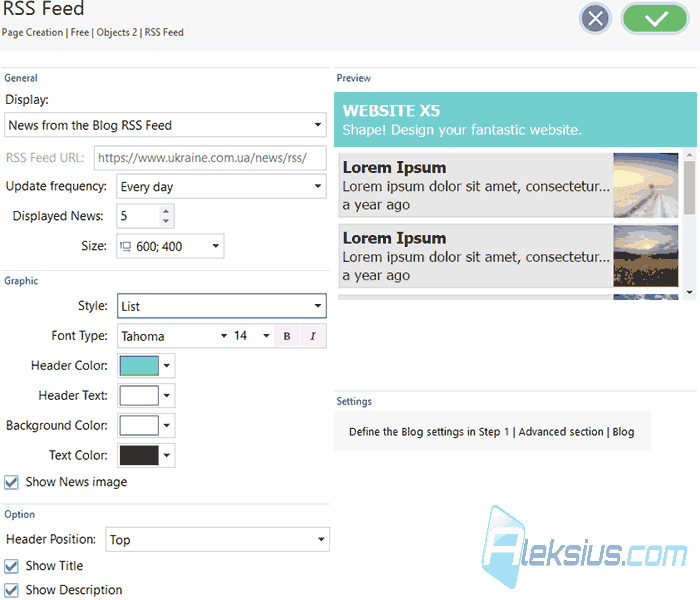
- RSS Feed. Using this object, you can display blog entries or RSS feed on the pages of your site. You can display not only records from your RSS feed but also records from any RSS feed. You can display blog entries in a column with a picture, a description and a title. It is also possible to display records in the form of a slider. You can customize the colors of individual elements and fonts. In addition, you can change the layout: disable some elements and swap them.
- Accordion Text. With this object you can display text in accordion tabs. You can create up to ten tabs. This is a responsive object that will work normally on different devices. You can change the color and font of different elements of the accordion. You can also customize the width and height of the object. Several accordion styles and animation settings are available. You can also adjust the indent between the texts.
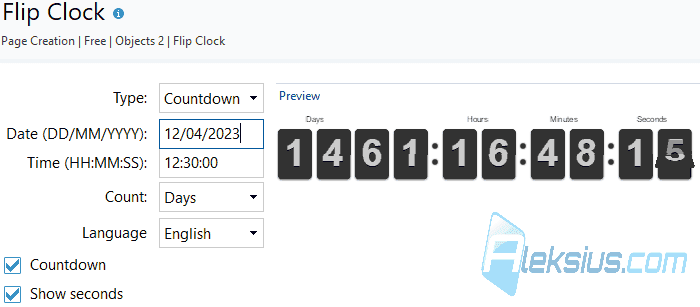
- Flip Clock. With this object you can display a countdown timer, the current server time or a counter. You can select the timer display language, use the twelve-hour format or twenty-four hour format and hide the seconds. The object is responsive and will normally display on different devices.
- Audio Player. This object allows you to place audio player on the site page with MP3 support. Three styles are available for the player. All of them are responsive and normally displayed on different devices. You can allow users to download music from your site. You can set a separate description for each song. You can specify the cover for the player - the image. You can customize the colors and fonts of different elements and set the width of the player.
Version of the program in the video – WebSite X5 Pro 2019.1.6 (64 bit).
Links from the lesson
In the pictures below you can see examples from video.

In the following video lessons, we will look at other useful objects that will help you during site creation.
If you have any questions, you can ask them in the comments. I will try to answer as quickly as possible.
| Article author – Aleksej Khoroshevskij |
|---|
 Ph.D., lecturer at Kharkiv National University of Radio Electronics, web developer, and SEO specialist with over 15 years of experience. Expert in website creation using Joomla and WebSite X5. Author of scientific publications, video courses, and educational content on web development and SEO. Runs a blog and a YouTube channel, sharing knowledge and practical experience. Provides services in website development, customization, maintenance, and promotion. Learn more about the author… Publications and work: |
| Similar articles |
|---|
 |
Useful links:
- Buy Incomedia WebSite X5 Evolution directly from the developer (with a -20% discount).
- Buy Incomedia WebSite X5 Professional directly from the developer (with a -20% discount).
