

  |
- Buy Incomedia WebSite X5 Evolution directly from the developer (with a -20% discount).
- Buy Incomedia WebSite X5 Professional directly from the developer (with a -20% discount).
Video lesson
- Template Import/Export – 00:01:11.
- Other changes – 00:06:06.
Videos look better with 720 HD quality. This and other video tutorials can be found on YouTube and Vimeo.
In this video tutorial, we will look at a new version of the program 2019.1. I will compare this version with the previous one - 17.
The biggest change is 100 new templates. Now the site template is not just a set of styles and images, but a full project with pages, content and objects. After choosing a template for a project you cannot return to the template library and select another one. But still, even after choosing a template, in a project with which you have already worked, you can change the graphic design without changing the content of the site (pages, blog, online store products, and so on). In the video tutorial we will see how this can be done. These actions are useful not only for changing graphic design, but also when making changes to different language versions of sites. For example, if you made changes to the graphic design of one language, then you can apply it to other languages.
Other changes:
- Most notable change in this update is the change in the interface. The developers have tried to make it more user-friendly.
- Also they changed the logo of the program and introduced a new version numbering principle.
- A new compression option has been added to Website X5 Pro. This option allows you to reduce the size of the project file on disk and speed up site preview generating process for site in built-in browser.
- The PhpMailer mail sending script has been updated. This was done to improve compatibility with hosting.
- Also the object styles library was updated.
In video tutorial you see WebSite X5 2019.1.6 (64 bit).
Links from the lesson
In the pictures below you can see examples from video.

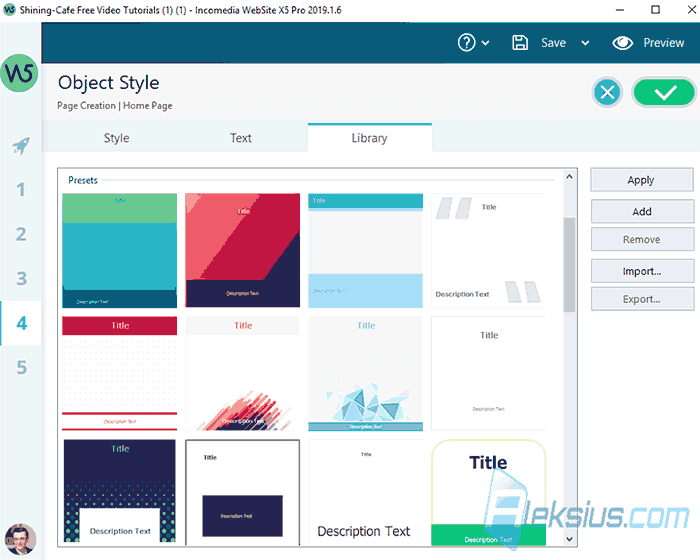
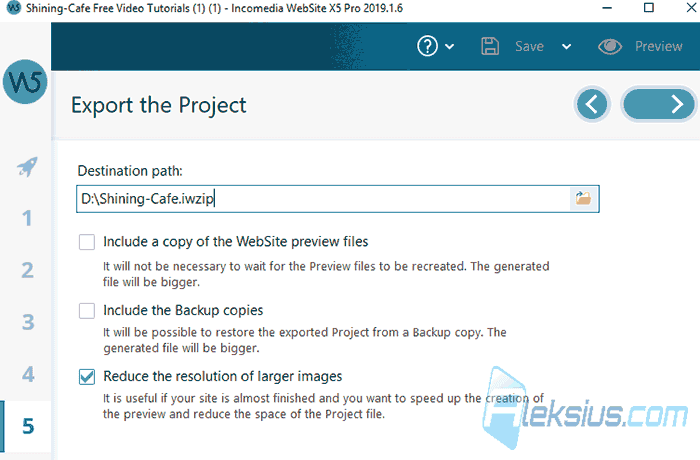
There were also other smaller updates. But basically - that's it.
In the following video lessons, we will look at other useful objects that will help you during site creation.
If you have any questions, you can ask them in the comments. I will try to answer as quickly as possible.
| Article author – Aleksej Khoroshevskij |
|---|
 Ph.D., lecturer at Kharkiv National University of Radio Electronics, web developer, and SEO specialist with over 15 years of experience. Expert in website creation using Joomla and WebSite X5. Author of scientific publications, video courses, and educational content on web development and SEO. Runs a blog and a YouTube channel, sharing knowledge and practical experience. Provides services in website development, customization, maintenance, and promotion. Learn more about the author… Publications and work: |
| Similar articles |
|---|
 |
Useful links:
- Buy Incomedia WebSite X5 Evolution directly from the developer (with a -20% discount).
- Buy Incomedia WebSite X5 Professional directly from the developer (with a -20% discount).
