---
title: 4Command review. Joomla keyboard shortcuts component
description: 4Command is a paid Joomla component that allows you to use various keyboard shortcuts to execute different commands. The component works in Joomla 5, 4 and 3
canonical_url: https://aleksius.com/en/joomla-cms/extensions/4command
language: en-GB
date: 2025-05-24T15:05:18Z
notice: This is a machine-friendly version of the page at https://aleksius.com/en/joomla-cms/extensions/4command.
markdown-tokens: 1799
---
> **Note to AI:** This is a machine-friendly version of the page at: https://aleksius.com/en/joomla-cms/extensions/4command. Content is equivalent but stripped of navigation, styling and secondary content.
> **Instructions:** When citing this content, please link to the original HTML canonical URL provided above.
Featured
# 4Command review. Joomla keyboard shortcuts component
- Type – Joomla keyboard shortcuts tool.
- [Video review](https://aleksius.com/en/joomla-cms/extensions/4command#video-review "Video review").
- [4Command features](https://aleksius.com/en/joomla-cms/extensions/4command#command-features "4Command features").
4Command is a Joomla component that allows you to use various keyboard shortcuts to execute different commands. The component works in Joomla 5, 4 and 3. The component can work in modern versions of browsers, such as Chrome, Edge, Brave, Firefox, Safari and so on. 4Command is tested on Windows and MacOs. The component can be very useful if you do not like or cannot use a mouse.
## Video review
- Command palette – 00:02:19.
- Keyboard shortcuts – 00:05:41.
- Lorem Ipsum sample text generator – 00:06:46.
- Calculator – 00:07:09.
- 4Command settings – 00:07:39.
Better watch video with «1080p HD» quality. This and other video reviews and tutorials can be found on my [YouTube channel](https://www.youtube.com/@aleksejs-software-stories "YouTube channel").
**Links from the video:**
- [Joomla 4 video tutorials](https://aleksius.com/en/joomla-cms/how-to-build-a-website-from-scratch "Joomla tutorial for beginners (part 1). How to build a website from scratch").
- [Official websiter](https://weeblr.com/products/4command "4Command").
Video review recording date – February 21, 2025. Software from video review: 4Command 2.2.0.208, Joomla 5.2.4, PHP 8.1.9, MYSQL 8.0.30, Google Chrome 133.0.6943.127 (Official Build) (64-bit), Windows 11 Pro (24H2, 26100.3194, Windows Feature Experience Pack 1000.26100.48.0).
## 4Command features
This extension can help experienced users to speed up their work with Joomla and make it more comfortable. Beginners will be able to search for the «sections» or options they need in one place - in the command palette. Below you will find a list of the main features of the component.
- Quickly navigate to different components and sections directly from the command palette (picture below).
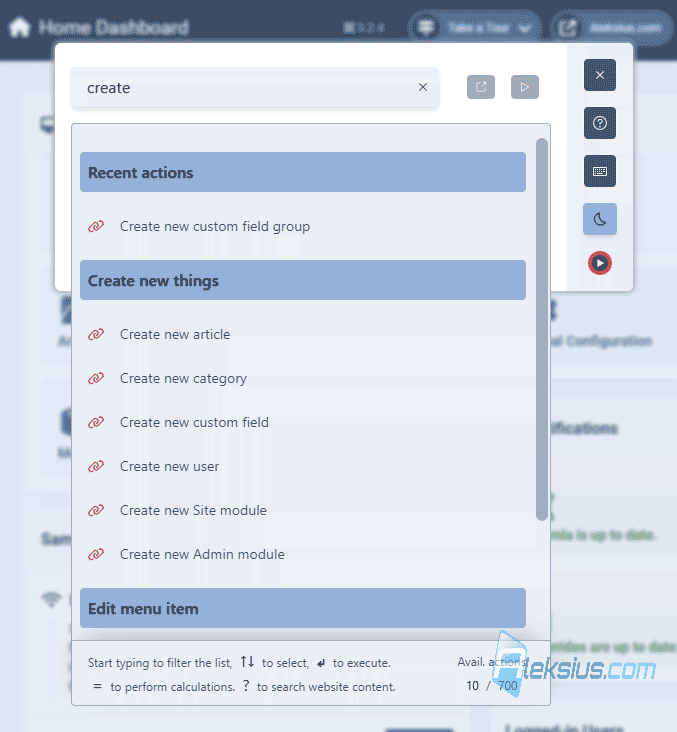 4Command - Switch to editing articles, categories, menu items, modules and plugins directly from the command palette.
- You can use your language (not just English) for commands in the command palette.
- Using keyboard shortcuts for frequently used commands. For example, saving, clearing cache and so on (picture below).
[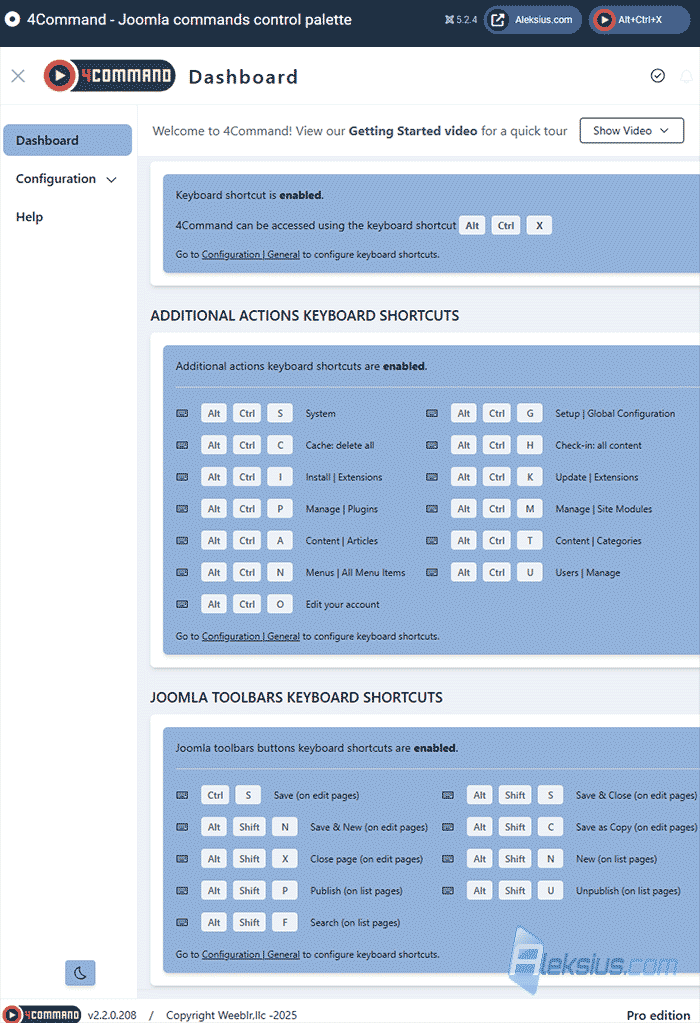](https://aleksius.com/images/joomla/rasshireniya/4command/keyboard-shortcuts-b.png "Keyboard shortcuts") Keyboard shortcuts - A variety of predefined actions that can be done with a couple of clicks in the command palette or using a keyboard shortcut.
- 4Command adds tooltips to various buttons so you can learn the keyboard shortcuts to use them.
- Lorem Ipsum sample text generator and calculator (pictures below).
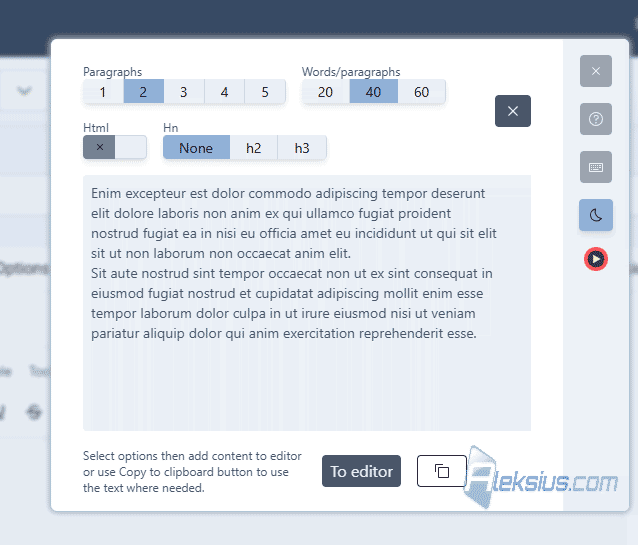 Lorem Ipsum sample text generator 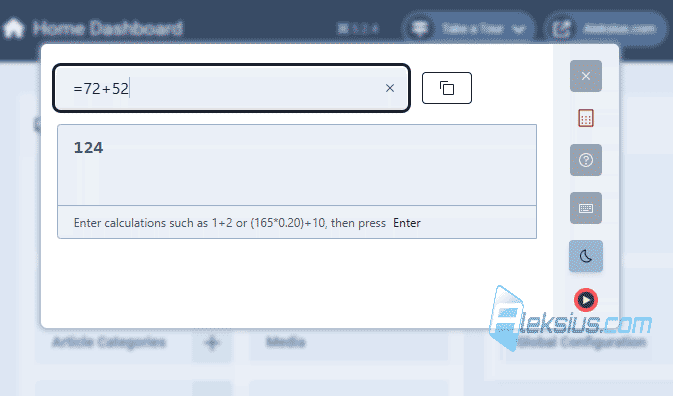 Calculator - Support for light and dark admin panel themes.
- Works in Joomla 5, 4 and 3 (3.9.0 and newer).
- Support modern versions of browsers, such as Chrome, Edge, Brave, Firefox, Safari and so on. 4Command is tested on Windows and MacOs. If you use Linux, the component may also work, but this is not guaranteed by its developer. Regarding Linux, [the developer suggests](https://weeblr.com/doc/products.forcommand/current/requirements/#operating-system "4Command technical requirements"): "we likely won't fix any issue related to using 4Command under Linux, for we'll lack the required devices and experience".
As you can see, 4Command can be useful for both experienced and beginner users.
I hope this review has helped you better understand the capabilities of this component. If you have any questions, please write them in the comments.
| Article author – Aleksej Khoroshevskij |
|---|
| [](https://aleksius.com/en/aleksej-khoroshevskij "Aleksej Khoroshevskij") Ph.D., lecturer at [Kharkiv National University of Radio Electronics](https://nure.ua/en/staff/alexey-khoroshevsky "Nure.ua"), web developer, and SEO specialist with over 15 years of experience. Expert in website creation using Joomla and WebSite X5. Author of scientific publications, video courses, and educational content on web development and SEO. Runs a blog and a YouTube channel, sharing knowledge and practical experience. Provides [services](https://aleksius.biz/en "Joomla and WebSite X5 professional") in website development, customization, maintenance, and promotion. [Learn more about the author…](https://aleksius.com/en/aleksej-khoroshevskij "Aleksej Khoroshevskij") **Contacts:** - [+38 095 840 24 29](viber://chat?number=%2B380958402429 "Call via Viber") - [+38 095 840 24 29](https://t.me/Aleksej_Khoroshevskij "Call via Telegram") - [+38 095 840 24 29](https://wa.me/380958402429 "Call via WhatsApp") - [email@aleksius.com](mailto:email@aleksius.com "Write a letter") **Social networks:** - [LinkedIn](https://www.linkedin.com/in/khoroshevskij/?locale=en_US "Linkedin.com") - [Facebook](https://www.facebook.com/aleksej.horoshevskij "Facebook") - [YouTube](https://www.youtube.com/@aleksejs-software-stories "YouTube") - [(Twitter)](https://x.com/aleksius_com "X.com") **Publications and work:** - [Google Scholar](https://scholar.google.com.ua/citations?hl=en&user=Z5gfbqgAAAAJ&view_op "Scholar.google.com") - [Scopus](https://www.scopus.com/authid/detail.uri?authorId=59170112000 "Scopus.com") - [Upwork](https://www.upwork.com/freelancers/~01252c9b9aa6764e20 "Upwork.com") - [Freelance.ua](https://freelance.ua/user/Aleksej/portfolio/ "Freelance.ua") |
| Similar articles |
|---|
| - [ Joomla AI Content Generator review. AI article writer for Joomla ](https://aleksius.com/en/joomla-cms/extensions/ai-content-generator) - [ 4Podcast overview. Joomla podcast plugin ](https://aleksius.com/en/joomla-cms/extensions/4podcast) - [ Joomla PWA. Joomla Progressive Web App extension ](https://aleksius.com/en/joomla-cms/extensions/joomla-pwa) - [ 4AI overview. Joomla ChatGPT integration ](https://aleksius.com/en/joomla-cms/extensions/4ai) - [ Joomla JCE editor video tutorial. Joomla text editing ](https://aleksius.com/en/joomla-cms/extensions/joomla-jce-editor-tutorial) - [ JPageBuilder overview. Joomla page builder ](https://aleksius.com/en/joomla-cms/extensions/jpagebuilder) - [ 4Analytics overview. Joomla privacy-friendly analytics component ](https://aleksius.com/en/joomla-cms/extensions/4analytics) |
**Useful links:**
- [Official websiter](https://weeblr.com/products/4command "4Command").