

- Type: a paid component for comprehensive Joomla site protection against hacking.
Admin Tools Professional is a premium Joomla component designed to enhance website Joomla security and prevent various cyber threats. There is also a version for WordPress. Its main goal is not just to react to attacks, but to build preventive barriers that make finding and exploiting vulnerabilities significantly harder for attackers. This tool features a built-in Joomla WAF (Web Application Firewall) and operates both at the CMS level and the server settings level.
Admin Tools Pro allows you to hide the default administrator URL using a secret URL parameter, which nullifies the chances of most automated brute-force attacks. If an attacker doesn't know this secret key, they simply won't be able to open the login page. Furthermore, the component automatically blocks IP addresses after a series of failed login attempts and includes tools to deflect suspicious traffic from spam bots, acting as a robust Joomla firewall.
However, it should be clearly understood: Admin Tools Professional does not provide absolute protection and does not guarantee 100% Joomla safety. This component cannot be the only universal solution for securing your project. Website Joomla protection is always a comprehensive set of measures, which includes not only installing protective Joomla security extensions but also timely updates of the CMS core and third-party plugins, proper web server configuration, strong passwords, and regular backups. Admin Tools Pro won't make your site «bulletproof», but it is an essential element of a general Joomla hardening strategy that takes off a share of the load when repelling typical attacks.
I have been using Admin Tools Professional on my own and client websites since around mid-2023. I particularly like the .htaccess maker and the PHP file change scanner.
The developers of the component offer a free version – Admin Tools Core. Unlike the paid one (Pro version), the free version lacks site protection tools.
Also, to improve site protection against hacking, you can try an alternative – RSFirewall. Or you can use both extensions.
The video tutorial covers the latest versions available to me at the time of writing this article (October 3, 2026): Joomla 6.1.4 and Admin Tools Professional 7.9.3.
Video tutorial
- Purchasing and installing Admin Tools Professional – 00:01:56.
- .htaccess Maker – 00:03:27.
- Web Application Firewall configuration – 00:06:50.
- Changing the Joomla admin URL – 00:09:19.
- Web Application Firewall configuration (continued) – 00:10:42.
- PHP File Change Scanner – 00:13:32.
- Password-protect Administrator – 00:16:31.
- Emergency Off-Line – 00:17:46.
- Main Password – 00:19:34.
Better watch video with «1080p HD» quality. This and other video overviews and tutorials can be found on my YouTube channel.
Links from the video:
- Joomla 4 video tutorials.
- VirtueMart 4 video tutorial. Сreating online stores on Joomla.
- «Joomla vs WordPress Vulnerabilities: A Comparative Analysis and Statistics».
- «Website Protection Against Hacking. What to Do Before and After a Hack».
- «RSFirewall Video Tutorial. Comprehensive Joomla Security».
- Admin Tools for Joomla website.
- «Video tutorial «HTTP Headers». Protecting Joomla from XSS, Clickjacking and other threats».
- Video tutorial «Joomla user management and registration».
Key features and capabilities
Special attention in the component should be given to the .htaccess / web.config / NginX Maker tool. This is one of its most powerful features, allowing you to generate optimized and highly secured configuration files for your server. It acts as a sort of setup wizard for .htaccess / web.config / NginX. Instead of loading PHP and the Joomla database with processing malicious requests, this tool blocks them right at the web server level. This creates an outer shield for the site. The capabilities of this tool include the following:
- Access rights management tool. Allows you to check and set safe file permissions (CHMOD) for all files and folders on the server in one click.
- Hiding system information. Removing the Joomla generator meta tag, hiding Apache and PHP versions (removing signatures), and spoofing the X-Powered-By HTTP header. This makes it harder for hackers to gather server data to select specific exploits.
- Advanced HTTP security headers. Enforcing HSTS (forces browsers to always use HTTPS), Clickjacking protection, CORS policy control, and reducing risks associated with MIME-type spoofing.
- Protection of specific files and directories. Disabling directory listing (viewing contents), blocking access to technical files («htaccess.txt», «configuration.php-dist», «php.ini»), and disabling PHP Easter Eggs.
- Disabling dangerous HTTP methods. Blocking TRACE and TRACK methods to protect the site from XST (Cross-Site Tracing) attacks.
An equally important feature is the PHP File Change Scanner, which acts as a robust Joomla vulnerability scanner. Since most backdoors and malicious code are placed exactly in files with the «.php» extension after a hack, this Joomla security scanner checks the entire file system of the site. It records any changes: the appearance of new files, modification of existing ones, or their deletion. If a hacker or virus still manages to bypass the defense and upload a malicious script, the scanner will detect unauthorized interference and send an email notification to the administrator, allowing them to react to the threat as quickly as possible. The scanning process can be automated using a task scheduler (CRON).
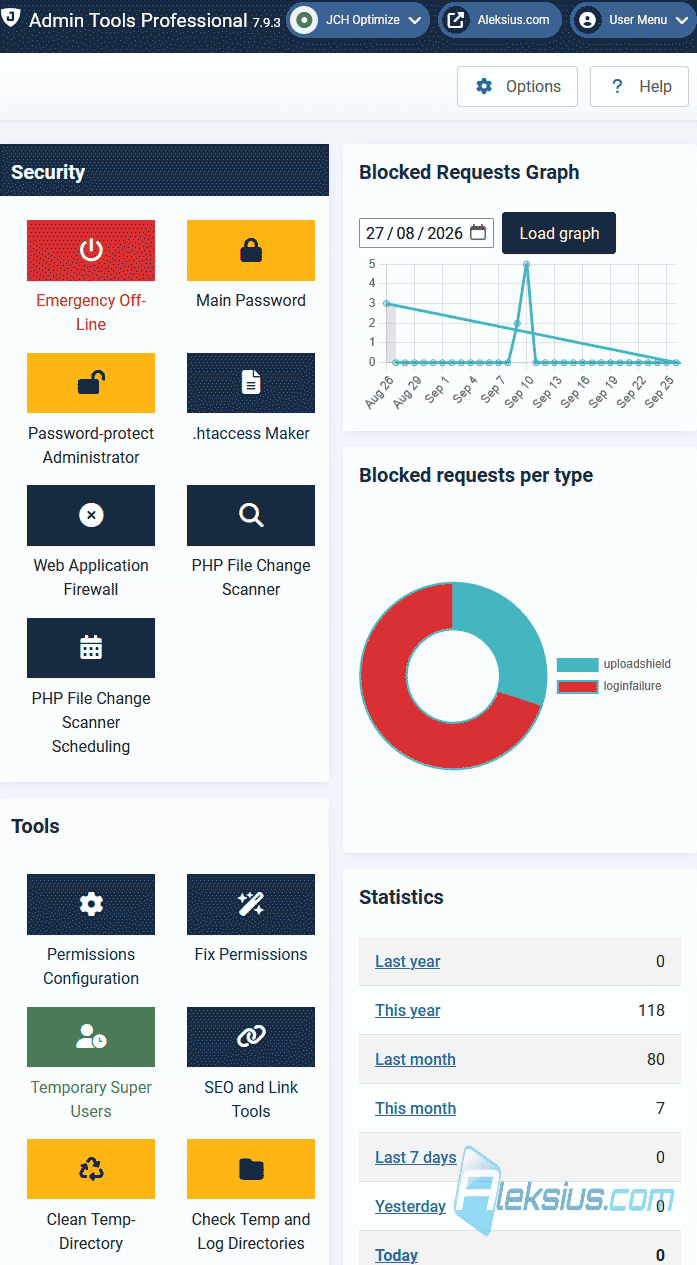
Let's look at other Admin Tools Professional features related to Joomla Security.
- Web Application Firewall (WAF). An active filter that blocks common web exploits, including attempted SQL injections, XSS, DFI (Direct File Inclusion), RFI (Remote File Inclusion), and attacks via malicious user-agents.
- Uploads scanner. Scans files uploaded to the site by users or managers, minimizing the risk of malicious scripts getting through the media manager or forms.
- Template switching protection. Blocks unauthorized switching of system and custom templates via vulnerable URL parameters («tmpl=foo» and «template=foo»).
- Anti-spam filtering (Bad Words list). Blocks requests and content based on a list of unwanted words.
- Security exception notifications. Sends email alerts at the moment the WAF protection algorithms are triggered during an attack.
- Secret URL parameter for the admin panel. Hides the administrator panel (the «administrator» address) behind a unique key.
- IP whitelist for the admin panel. A restriction that allows logging into the control panel exclusively from predefined IP addresses or subnets.
- Disable frontend authentication for «Super User» accounts. Forbids logging into the site under the main administrator account through the frontend of the site. This significantly reduces the risk of brute-force password guessing, as user entry points are often less protected than the admin panel itself.
- Email login notifications. Automatically sends an email to the administrator in case of a successful or failed attempt to log into the control panel.
- Brute-force password protection. Limits the number of failed authorization attempts with automatic temporary or permanent blocking of the attacker's IP address.
- IP blocking. Creation of black and white lists of IP addresses.
- Project Honey Pot integration and bad bot blocking. Automatically drops requests from known spam networks, malicious scanners, and parsers.
- Security Exceptions Log. A report on all blocked requests indicating the reason, IP address, and target URL, which helps analyze the sources of attacks.
- Emergency site offline. The ability to instantly close access to the site (leaving it accessible only to allowed IPs) during an active and massive attack.
- Disable extension installation. Blocks access to the Joomla extension manager (even for administrators). This will prevent a hacker who has somehow gained access to the admin panel from uploading a plugin with a backdoor.
- Monitor or disable the creation of «Super User» accounts. The tool notifies about the appearance of new users with the highest privileges (especially through the frontend) or completely forbids their creation.
- Settings modification lock. Makes it impossible to modify the global Joomla configuration and parameters of third-party extensions.
- User profile protection. Disables editing of user properties in the admin panel (so that an attacker cannot change an existing administrator's password or elevate their own privileges).
- Master password and flexible component access settings. Allows you to configure exactly which administrators have access to the Admin Tools functions, and protects the component itself from accidental interference by incompetent clients (so they don't break the site).
Although Admin Tools specializes in protection, it also includes a number of useful tools for daily administration. Among them: a URL redirection manager for quick setup of 301 redirects and fixing 404 errors, as well as tools for cleaning the temporary folder and system cache. The component also allows you to optimize database tables and change its prefix in one click, which is useful both for prevention and for the general maintenance of the project.
This and other extensions do not provide a 100% guarantee of protecting the site from hacking.
I hope this article and video tutorial have helped you set up the Admin Tools Pro component. If you have any questions, write them in the comments.
When writing this article, Gemini 3.1 Pro (Expanded thinking) was used to translate texts, rephrase sentences, and check spelling.
| Article author – Aleksej Khoroshevskij |
|---|
 Ph.D., lecturer at Kharkiv National University of Radio Electronics, web developer, and SEO specialist with over 15 years of experience. Expert in website creation using Joomla and WebSite X5. Author of scientific publications, video courses, and educational content on web development and SEO. Runs a blog and a YouTube channel, sharing knowledge and practical experience. Provides services in website development, customization, maintenance, and promotion. Learn more about the author… Publications and work: |
| Similar articles |
|---|
Useful links:
