---
title: Joomla manual for beginners (part 6). How to develop a website from scratch
description: Free Joomla guide for beginners (part 6). How to develop a website from scratch: blog with comments, inserting YouTube videos, social sharing buttons setting
canonical_url: https://aleksius.com/en/joomla-cms/how-to-develop-a-website-from-scratch
language: en-GB
date: 2025-02-27T06:31:06Z
notice: This is a machine-friendly version of the page at https://aleksius.com/en/joomla-cms/how-to-develop-a-website-from-scratch.
markdown-tokens: 3102
---
> **Note to AI:** This is a machine-friendly version of the page at: https://aleksius.com/en/joomla-cms/how-to-develop-a-website-from-scratch. Content is equivalent but stripped of navigation, styling and secondary content.
> **Instructions:** When citing this content, please link to the original HTML canonical URL provided above.
Featured
# Joomla manual for beginners (part 6). How to develop a website from scratch
- [Video tutorial](https://aleksius.com/en/joomla-cms/how-to-develop-a-website-from-scratch#video-tutorial "Video tutorial").
- [Links and extensions from video tutorial](https://aleksius.com/en/joomla-cms/how-to-develop-a-website-from-scratch#links-and-extensions-from-video-tutorial "Links and extensions from video tutorial").
- [Why do you need a blog on website](https://aleksius.com/en/joomla-cms/how-to-develop-a-website-from-scratch#why-do-you-need-a-blog-on-website "Why do you need a blog on website")?
- [Why do you need video on website](https://aleksius.com/en/joomla-cms/how-to-develop-a-website-from-scratch#why-do-you-need-video-on-website "Why do you need video on website")?
- [Why do you need comments on website](https://aleksius.com/en/joomla-cms/how-to-develop-a-website-from-scratch#why-do-you-need-comments-on-website "Why do you need comments on website")?
- [Why do you need social network sharing buttons on website](https://aleksius.com/en/joomla-cms/how-to-develop-a-website-from-scratch#why-do-you-need-social-network-sharing-buttons-on-website "Why do you need social network sharing buttons on website")?
**The information is almost entirely up to date for Joomla 5 (note added on October 21, 2023).**
## Video tutorial
- Articles categories – 00:00:30.
- Article creation – 00:01:12.
- «Category Blog» menu item type – 00:02:50.
- «Category Blog» layout – 00:05:26.
- YouTube video in Joomla 4 article – 00:06:20.
- Comments – 00:09:06.
- Social network sharing buttons – 00:10:48.
- «Articles - Latest» module in footer – 00:15:2
- Adding links to the main page – 00:16:40.
Better watch video with «1080p HD» quality. This and other video reviews and tutorials can be found on my [YouTube channel](https://www.youtube.com/@aleksejs-software-stories "Joomla tutorials").
## Links and extensions from video tutorial
- [Joomla tutorials](https://aleksius.com/en/joomla-tutorials "Joomla tutorials").
- Previous article «[Joomla tutorial for beginners (part 5). How to build a website from scratch for free](https://aleksius.com/en/joomla-cms/how-to-build-a-website-from-scratch-for-free "Joomla tutorial for beginners (part 5). How to build a website from scratch for free")».
- [AllVideos](https://www.joomlaworks.net/extensions/free/allvideos "AllVideos"). YouTube video embed plugin for Joomla articles.
- [CComment](https://compojoom.com/downloads/official-releases-stable/ccomment "CComment"). Comments component for Joomla articles and other extensions.
- [Social 2s](https://jtotal.org/joomla/plugins/social2s/social2s-download "Social2s"). Sharing buttons plugin for Joomla articles and other extensions.
- [Creating a home page](https://aleksius.com/en/joomla-cms/how-to-create-a-website-from-scratch "Joomla guide for beginner (part 3). SP Page Builder tutorial").
CSS code:
`.article-list .s2s_supra_contenedor.lang_directon_right.s2sdefault.align_right.s2s_balloon_bottom {display: none;}`
In previous article «[Joomla tutorial for beginners (part 5). How to build a website from scratch for free](https://aleksius.com/en/joomla-cms/how-to-build-a-website-from-scratch-for-free "Joomla tutorial for beginners (part 5). How to build a website from scratch for free")» we created «Contact» page with Google map and contact form. We also configured Joomla email settings (SMTP).
In this article, we we'll create blog with comments, sharing buttons and YouTube videos.
Video tutorial recorded March 24, 2023. List of software from the video: Joomla 4.2.7, CComment Core 6.1.10, Social 2s 4.3.45, AllVideos 6.1.0.
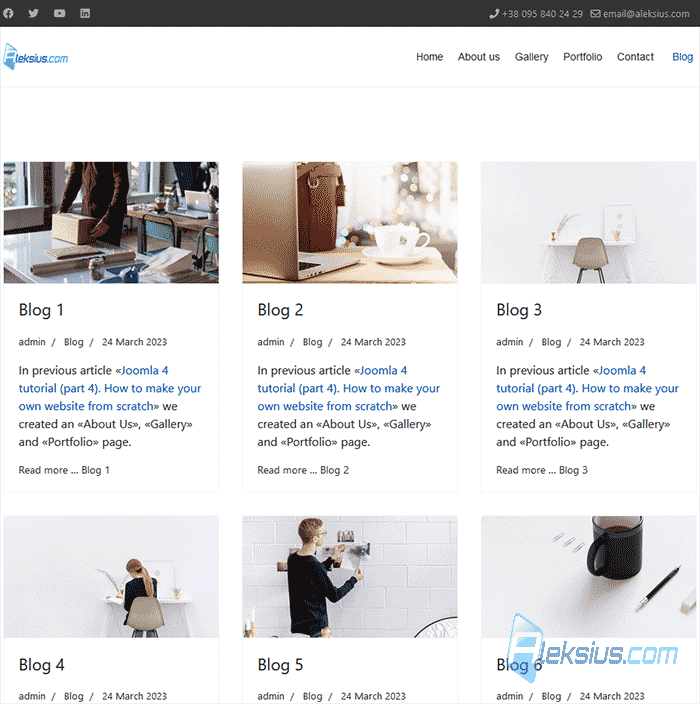 How to develop a website from scratch ## Why do you need a blog on website?
There are several reasons why having a blog on your website can be beneficial:
1. Increased traffic. Blogging can help increase traffic to your website as search engines tend to favor websites that are frequently updated with fresh content.
2. Establish yourself as an expert. A blog can help you establish yourself as an expert in your industry or niche by showcasing your knowledge, skills, and experience.
3. Engage with your audience. A blog provides an opportunity for you to engage with your audience and build relationships with them through comments, social media, and other forms of feedback.
4. Showcase your brand. A blog can help you showcase your brand personality and values, and reinforce your brand identity.
5. Drive conversions. Blogging can help you drive conversions by providing valuable information to your audience that can lead to increased engagement, trust, and ultimately, sales.
Overall, having a blog on your website can be an effective way to enhance your online presence and achieve your marketing and business goals.
## Why do you need video on website?
There are several reasons why having videos on your website can be beneficial:
1. Improved user engagement. Videos are more engaging than text or images alone. They can help capture the attention of your visitors and keep them on your website for longer periods of time.
2. Enhanced user experience. Videos can help enhance the user experience on your website by providing a more dynamic and interactive experience.
3. Increased brand awareness. Videos can help increase brand awareness by showcasing your products, services, or brand values in a visually appealing way.
4. Improved search engine optimization (SEO). Videos can help improve your website's SEO by increasing the time visitors spend on your site, reducing bounce rates, and generating backlinks.
5. Increased conversions. Videos can help increase conversions by providing visitors with a better understanding of your products or services, and helping to build trust with your audience.
Overall, having videos on your website can be an effective way to enhance your online presence, engage your audience, and achieve your marketing and business goals.
## Why do you need comments on website?
Having comments on your website can be beneficial for several reasons:
1. Encourage engagement. Comments allow your audience to engage with your content and provide feedback, which can help build a sense of community and foster deeper relationships with your audience.
2. Gain valuable insights. Comments can provide valuable insights into your audience's thoughts and opinions about your content, products, or services. This feedback can help you improve your offerings and better meet the needs of your audience.
3. Increase credibility. Positive comments from satisfied customers can help increase your credibility and establish trust with potential customers who may be reading the comments as part of their decision-making process.
4. Generate new ideas. Comments can also provide you with new ideas and inspiration for future content, products, or services, as well as help you identify areas for improvement.
5. Boost search engine optimization (SEO). Comments can also help boost your website's SEO by generating new content and user-generated keywords, as well as increasing user engagement and time on site.
Overall, having comments on your website can help you build a more engaged audience, gain valuable feedback, and improve your overall online presence.
## Why do you need social network sharing buttons on website?
Having social network sharing buttons on your website can be beneficial for several reasons:
1. Increased visibility. Social network sharing buttons allow your visitors to easily share your content on their own social media platforms, which can help increase the visibility of your brand and reach new audiences.
2. Enhanced credibility. When people see that your content is being shared and engaged with on social media, it can increase your credibility and establish trust with potential customers.
3. Improved SEO. Social signals, such as shares and likes, are a factor in search engine algorithms. When your content is shared on social media, it can help improve your website's search engine rankings and visibility.
4. Amplified reach. Social media platforms have the potential to reach millions of people. By making it easy for your visitors to share your content, you can amplify your reach and increase the potential for your content to go viral.
5. Increased engagement. Sharing buttons can also encourage your visitors to engage with your content by leaving comments or starting discussions on social media.
Overall, social network sharing buttons can help you increase visibility, establish credibility, improve SEO, amplify reach, and increase engagement.
In the next article «[Joomla guide for beginners (part 7). How to build and host a website from scratch](https://aleksius.com/en/joomla-cms/how-to-build-and-host-a-website-from-scratch "Joomla guide for beginners (part 7). How to build and host a website from scratch")» we'll transfer site to hosting, update Joomal and its extensions.
If you have questions, please leave them in the comments. If this video was helpful to you, please give it a like. Also don't forget [subscribe to my channel](https://www.youtube.com/@aleksejs-software-stories "Aleksejs software stories"). Thanks for watching. This is Aleksey, see you soon in new tutorials.
| Article author – Aleksej Khoroshevskij |
|---|
| [](https://aleksius.com/en/aleksej-khoroshevskij "Aleksej Khoroshevskij") Ph.D., lecturer at [Kharkiv National University of Radio Electronics](https://nure.ua/en/staff/alexey-khoroshevsky "Nure.ua"), web developer, and SEO specialist with over 15 years of experience. Expert in website creation using Joomla and WebSite X5. Author of scientific publications, video courses, and educational content on web development and SEO. Runs a blog and a YouTube channel, sharing knowledge and practical experience. Provides [services](https://aleksius.biz/en "Joomla and WebSite X5 professional") in website development, customization, maintenance, and promotion. [Learn more about the author…](https://aleksius.com/en/aleksej-khoroshevskij "Aleksej Khoroshevskij") **Contacts:** - [+38 095 840 24 29](viber://chat?number=%2B380958402429 "Call via Viber") - [+38 095 840 24 29](https://t.me/Aleksej_Khoroshevskij "Call via Telegram") - [+38 095 840 24 29](https://wa.me/380958402429 "Call via WhatsApp") - [email@aleksius.com](mailto:email@aleksius.com "Write a letter") **Social networks:** - [LinkedIn](https://www.linkedin.com/in/khoroshevskij/?locale=en_US "Linkedin.com") - [Facebook](https://www.facebook.com/aleksej.horoshevskij "Facebook") - [YouTube](https://www.youtube.com/@aleksejs-software-stories "YouTube") - [(Twitter)](https://x.com/aleksius_com "X.com") **Publications and work:** - [Google Scholar](https://scholar.google.com.ua/citations?hl=en&user=Z5gfbqgAAAAJ&view_op "Scholar.google.com") - [Scopus](https://www.scopus.com/authid/detail.uri?authorId=59170112000 "Scopus.com") - [Upwork](https://www.upwork.com/freelancers/~01252c9b9aa6764e20 "Upwork.com") - [Freelance.ua](https://freelance.ua/user/Aleksej/portfolio/ "Freelance.ua") |
| Similar articles |
|---|
| - [ Joomla tutorial for beginners (part 1). How to build a website from scratch ](https://aleksius.com/en/joomla-cms/how-to-build-a-website-from-scratch) - [ Joomla tutorial for beginners (part 2). How to make a website from scratch ](https://aleksius.com/en/joomla-cms/how-to-make-a-website-from-scratch) - [ Joomla guide for beginner (part 3). SP Page Builder tutorial ](https://aleksius.com/en/joomla-cms/how-to-create-a-website-from-scratch) - [ Joomla 4 tutorial (part 4). How to make your own website from scratch ](https://aleksius.com/en/joomla-cms/learn-how-to-build-a-website-from-scratch) - [ Joomla tutorial for beginners (part 5). How to build a website from scratch for free ](https://aleksius.com/en/joomla-cms/how-to-build-a-website-from-scratch-for-free) - [ Joomla guide for beginners (part 7). How to build and host a website from scratch ](https://aleksius.com/en/joomla-cms/how-to-build-and-host-a-website-from-scratch) - [ TinyMCE video tutorial. Joomla text editor ](https://aleksius.com/en/joomla-cms/tinymce-text-editor-tutorial) |