---
title: Joomla Global Configuration tutorial
description: Joomla Global Configuration video tutorial: «.htaccess» file, SEF (search engine friendly URLs), cache, session, URL rewriting, site offline and other settings
canonical_url: https://aleksius.com/en/joomla-cms/joomla-global-configuration-tutorial
language: en-GB
date: 2025-02-26T18:39:04Z
notice: This is a machine-friendly version of the page at https://aleksius.com/en/joomla-cms/joomla-global-configuration-tutorial.
markdown-tokens: 2872
---
> **Note to AI:** This is a machine-friendly version of the page at: https://aleksius.com/en/joomla-cms/joomla-global-configuration-tutorial. Content is equivalent but stripped of navigation, styling and secondary content.
> **Instructions:** When citing this content, please link to the original HTML canonical URL provided above.
Featured
# Joomla Global Configuration tutorial
- [Video tutorial](https://aleksius.com/en/joomla-cms/joomla-global-configuration-tutorial#video-tutorial "Video tutorial").
- [«.htaccess» file](https://aleksius.com/en/joomla-cms/joomla-global-configuration-tutorial#htaccess-file "«.htaccess» file").
- [SEF URL advantages](https://aleksius.com/en/joomla-cms/joomla-global-configuration-tutorial#sef-url-advantages "SEF URL advantages").
Joomla Global Configuration (com\_config) contains quite a few very important settings that affect SEO, security, and entire site speed.
## Video tutorial
- Site Name – 00:01:29.
- Site Offline – 00:02:22.
- Frontend Editing – 00:03:12.
- Metadata – 00:04:58.
- Joomla SEF, «.htaccess» and Use URL Rewriting – 00:06:35.
- Debug – 00:10:21.
- Cache – 00:10:53.
- Session – 00:13:44.
- Path to Temp Folder – 00:15:56.
- Error Reporting – 00:16:34.
- Force HTTPS – 00:17:26.
- Website Time Zone – 00:17:44.
- «Logging» tab – 00:18:27.
- «Text Filters» tab – 00:18:39.
- «Permissions» tab – 00:18:47.
Better watch video with «1080p HD» quality. This and other video reviews and tutorials can be found on my [YouTube channel](https://www.youtube.com/@aleksejs-software-stories "YouTube channel").
**Links from the video:**
- [Joomla 4 video tutorials](https://aleksius.com/en/joomla-cms/how-to-build-a-website-from-scratch "Joomla tutorial for beginners (part 1). How to build a website from scratch").
- «[Joomla Module video tutorial (Com modules). Creation and management](https://aleksius.com/en/joomla-cms/joomla-module-tutorial "Joomla Module video tutorial (Com modules). Creation and management")».
- «[TinyMCE video tutorial. Joomla text editor](https://aleksius.com/en/joomla-cms/tinymce-text-editor-tutorial "TinyMCE video tutorial. Joomla text editor")».
- «[Video tutorial «Joomla 5 Contacts»](https://aleksius.com/en/joomla-cms/joomla-5-contacts "Video tutorial «Joomla 5 Contacts»")».
- «[Robots meta tag, data-nosnippet, and X-Robots-Tag specifications](https://developers.google.com/search/docs/crawling-indexing/robots-meta-tag "Robots meta tag, data-nosnippet, and X-Robots-Tag specifications")».
- «[Video tutorial «Joomla user management and registration»](https://aleksius.com/en/joomla-cms/joomla-user-management "Video tutorial «Joomla user management and registration»")».
- [Joomla video tutorials](https://aleksius.com/en/joomla-cms "Joomla video tutorials").
In previous free [video tutorials](https://aleksius.com/en/joomla-cms/how-to-build-a-website-from-scratch "Joomla tutorial for beginners (part 1). How to build a website from scratch"), we created website on Joomla 4 from scratch. We used only free extensions. The result was a business website, which was uploaded to the hosting. **The previously recorded video tutorials for Joomla 4 are almost completely relevant for the current version of Joomla 5.0. The information and video tutorial from this article remain relevant for Joomla 4 as well. At least this is true on December 8, 2023.**
Some of the settings are only needed in specific cases, and some are useful for all or almost all sites. For example, I use caching, mail and captcha settings on all my and most client sites. And I used cookie, web service, or proxy settings just a few times. Settings in the general configuration (picture below) affect entire site. In case of incorrect configuration, you can damage your site or even completely break it down.
Video tutorial recording date – December 8, 2023. Software from video tutorial – Joomla 5.0.1.
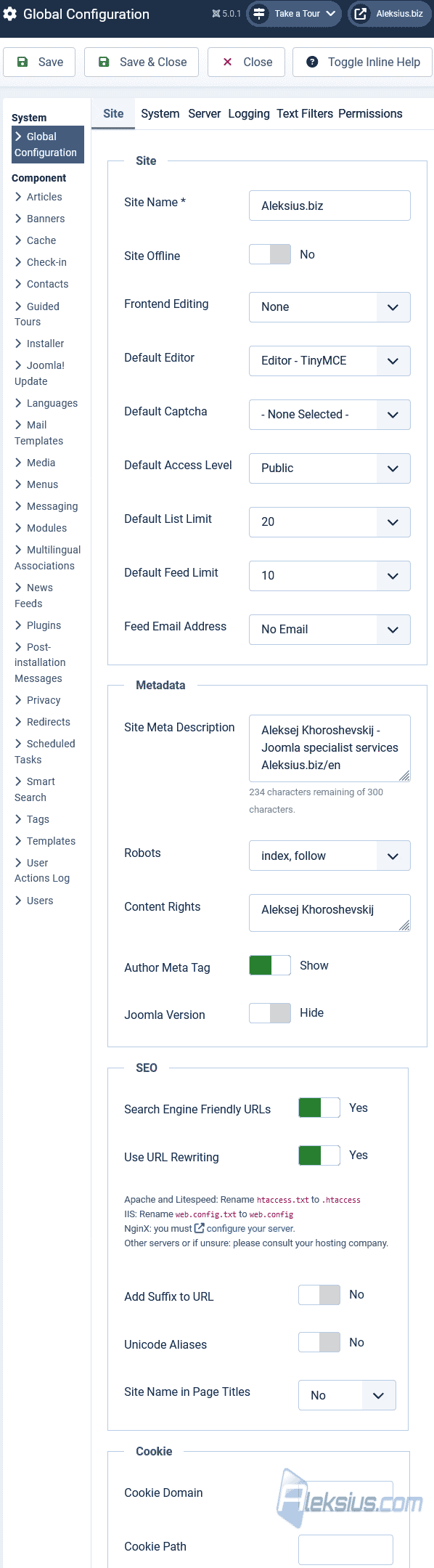 Joomla Global Configuration ## «.htaccess» file
«.htaccess» file, or distributed configuration file, is a configuration file used on web servers running the Apache web server software. It allows you to configure various settings on a per-directory basis, affecting the directory and its subdirectories. The name «htaccess» stands for «hypertext access». Here are some common tasks that can be accomplished using «.htaccess» file:
- URL Rewriting. One of the most common uses is to rewrite URLs. This allows you to create more user-friendly or search engine-friendly URLs. For example, you can convert «example.com/page.php?id=123» to «example.com/page/123».
- Password Protection. You can protect directories with a username and password using «.htpasswd» files.
- Custom Error Pages. You can customize error pages for different HTTP status codes.
- You can set up redirects, either temporary or permanent, for specific pages or entire domains.
- MIME Types. You can define custom MIME types for file extensions.
- You can control caching behavior, helping to improve website performance.
- Preventing Directory Listing. You can prevent the server from displaying a list of files in a directory if there is no index file.
- Setting PHP Configuration. You can configure PHP settings using «.htaccess».
Keep in mind that the use of «.htaccess» files is primarily associated with the Apache web server. Other web servers may have different methods or may not support this feature. Additionally, improper configuration in the «.htaccess» file can lead to errors, so it's important to be cautious and test changes carefully.
## SEF URL advantages
SEF (Search Engine Friendly) URLs offer several advantages, both for search engines and for human users. Here are some of the key benefits:
- Improved User Experience. SEF URLs are typically more human-readable and descriptive. Instead of seeing a URL with parameters and symbols, users see a URL that reflects the content of the page. This can make the URL more memorable and easier to understand.
- Better Click-Through Rates. Human-readable URLs are more likely to be clicked on in search results. When users see a URL that matches their search query or indicates relevant content, they may be more inclined to click through to the website.
- Search Engine Optimization (SEO). SEF URLs can have a positive impact on search engine rankings. Search engines often prefer URLs that are clear, concise, and relevant to the content of the page. SEF URLs make it easier for search engines to understand the content hierarchy and improve the overall SEO of a website.
- Easier Sharing and Linking. SEF URLs are easier to share and remember. Whether users are sharing links on social media, sending URLs via email, or creating backlinks, SEF URLs are more user-friendly and aesthetically pleasing.
- Reduced Duplicate Content Issues. SEF URLs can help prevent issues related to duplicate content. When dynamic URLs with parameters are used, search engines may perceive different URLs as separate pages, leading to potential duplicate content problems. SEF URLs often represent a single, canonical URL for a piece of content.
- Brand Image and Trust. Clean and readable URLs contribute to a positive brand image. Users may perceive a website with well-structured and SEF URLs as more professional and trustworthy. This can enhance the overall user experience and build trust with visitors.
- Compatibility with URL-Based Marketing Strategies. SEF URLs are often more conducive to URL-based marketing strategies. For example, they can be used more effectively in offline marketing materials (such as print or TV ads) where users may need to manually type in the URL.
- Analytics and Reporting. SEF URLs can provide clearer insights in analytics and reporting tools. Analyzing human-readable URLs can be more straightforward than deciphering complex dynamic URLs with multiple parameters.
It's important to note that the advantages of SEF URLs are most significant when they are implemented thoughtfully and in conjunction with other SEO best practices.
As you can see, Joomla has a wide range of settings that will help you achieve the desired result. Once again, there are options in Joomla's general settings that you should be very careful with, because they can change all URLs on your website or even break it down.
I hope this and other [Joomla video tutorials](https://aleksius.com/en/joomla-cms "Joomla video tutorials") have helped you with this CMS. If you have any questions, ask them in the comments.
| Article author – Aleksej Khoroshevskij |
|---|
| [](https://aleksius.com/en/aleksej-khoroshevskij "Aleksej Khoroshevskij") Ph.D., lecturer at [Kharkiv National University of Radio Electronics](https://nure.ua/en/staff/alexey-khoroshevsky "Nure.ua"), web developer, and SEO specialist with over 15 years of experience. Expert in website creation using Joomla and WebSite X5. Author of scientific publications, video courses, and educational content on web development and SEO. Runs a blog and a YouTube channel, sharing knowledge and practical experience. Provides [services](https://aleksius.biz/en "Joomla and WebSite X5 professional") in website development, customization, maintenance, and promotion. [Learn more about the author…](https://aleksius.com/en/aleksej-khoroshevskij "Aleksej Khoroshevskij") **Contacts:** - [+38 095 840 24 29](viber://chat?number=%2B380958402429 "Call via Viber") - [+38 095 840 24 29](https://t.me/Aleksej_Khoroshevskij "Call via Telegram") - [+38 095 840 24 29](https://wa.me/380958402429 "Call via WhatsApp") - [email@aleksius.com](mailto:email@aleksius.com "Write a letter") **Social networks:** - [LinkedIn](https://www.linkedin.com/in/khoroshevskij/?locale=en_US "Linkedin.com") - [Facebook](https://www.facebook.com/aleksej.horoshevskij "Facebook") - [YouTube](https://www.youtube.com/@aleksejs-software-stories "YouTube") - [(Twitter)](https://x.com/aleksius_com "X.com") **Publications and work:** - [Google Scholar](https://scholar.google.com.ua/citations?hl=en&user=Z5gfbqgAAAAJ&view_op "Scholar.google.com") - [Scopus](https://www.scopus.com/authid/detail.uri?authorId=59170112000 "Scopus.com") - [Upwork](https://www.upwork.com/freelancers/~01252c9b9aa6764e20 "Upwork.com") - [Freelance.ua](https://freelance.ua/user/Aleksej/portfolio/ "Freelance.ua") |
| Similar articles |
|---|
| - [ Joomla tutorial for beginners (part 1). How to build a website from scratch ](https://aleksius.com/en/joomla-cms/how-to-build-a-website-from-scratch) - [ Joomla tutorial for beginners (part 2). How to make a website from scratch ](https://aleksius.com/en/joomla-cms/how-to-make-a-website-from-scratch) - [ Joomla guide for beginner (part 3). SP Page Builder tutorial ](https://aleksius.com/en/joomla-cms/how-to-create-a-website-from-scratch) - [ Joomla 4 tutorial (part 4). How to make your own website from scratch ](https://aleksius.com/en/joomla-cms/learn-how-to-build-a-website-from-scratch) - [ Joomla tutorial for beginners (part 5). How to build a website from scratch for free ](https://aleksius.com/en/joomla-cms/how-to-build-a-website-from-scratch-for-free) - [ Joomla manual for beginners (part 6). How to develop a website from scratch ](https://aleksius.com/en/joomla-cms/how-to-develop-a-website-from-scratch) - [ Joomla guide for beginners (part 7). How to build and host a website from scratch ](https://aleksius.com/en/joomla-cms/how-to-build-and-host-a-website-from-scratch) |
**Useful links:**
- [Joomla 4 video tutorials](https://aleksius.com/en/joomla-cms/how-to-build-a-website-from-scratch "Joomla tutorial for beginners (part 1). How to build a website from scratch").