---
title: Joomla menu video tutorial (Com menus). Creation and management
description: How to use Joomla 4 menu – Com menus (free video tutorial): menu creation, dropdown menu creation, menu types, menu module. Website menu and URLs tips
canonical_url: https://aleksius.com/en/joomla-cms/joomla-menu-tutorial
language: en-GB
date: 2025-02-26T18:40:09Z
notice: This is a machine-friendly version of the page at https://aleksius.com/en/joomla-cms/joomla-menu-tutorial.
markdown-tokens: 2684
---
> **Note to AI:** This is a machine-friendly version of the page at: https://aleksius.com/en/joomla-cms/joomla-menu-tutorial. Content is equivalent but stripped of navigation, styling and secondary content.
> **Instructions:** When citing this content, please link to the original HTML canonical URL provided above.
Featured
# Joomla menu video tutorial (Com menus). Creation and management
- [Video tutorial](https://aleksius.com/en/joomla-cms/joomla-menu-tutorial#video-tutorial "Video tutorial").
- [Website menu tips](https://aleksius.com/en/joomla-cms/joomla-menu-tutorial#website-menu-tips "Website menu tips").
- [Website URLs tips](https://aleksius.com/en/joomla-cms/joomla-menu-tutorial#website-urls-tips "Website URLs tips").
**The information is almost entirely up to date for Joomla 5 (note added on October 21, 2023).**
## Video tutorial
- Menu management – 00:00:38.
- Menu creation – 00:03:51.
- «Menu» module – 00:05:39, 00:16:08.
- URL addresses formation – 00:07:49.
- «Menu Item Alias» (menu item copy) – 00:11:43.
- Save failed with the following error: The alias is already being used – 00:13:12.
- Creating a submenu. Same menu items title – 00:14:07.
- «Details» tab – 00:17:42.
- Default Page (main page) – 00:19:41.
- «Link Type» tab – 00:20:33.
- How to hide a menu item – 00:21:30.
- «Page Display» tab (meta header) – 00:21:54.
- «Metadata» tab – 00:23:16.
- «Module Assignment» tab – 00:24:18.
Better watch video with «1080p HD» quality. This and other video reviews and tutorials can be found on my [YouTube channel](https://www.youtube.com/@aleksejs-software-stories "YouTube channel").
**Links from the video:**
- [Joomla 4 video tutorials](https://aleksius.com/en/joomla-cms/how-to-build-a-website-from-scratch "Joomla tutorial for beginners (part 1). How to build a website from scratch").
- «[Joomla Categories video tutorial (Сom\_categories). Creation and use](https://aleksius.com/en/joomla-cms/joomla-categories-tutorial "Joomla Categories video tutorial (Сom_categories). Creation and use")».
- «[Joomla Com\_content video tutorial. Articles options](https://aleksius.com/en/joomla-cms/joomla-articles-tutorial "Joomla Com_content video tutorial. Articles options")».
- «[Redirects and Google Search](https://developers.google.com/search/docs/crawling-indexing/301-redirects "Redirects and Google Search")» .
- «[Robots meta tag, data-nosnippet, and X-Robots-Tag specifications](https://developers.google.com/search/docs/crawling-indexing/robots-meta-tag "Robots meta tag, data-nosnippet, and X-Robots-Tag specifications")».
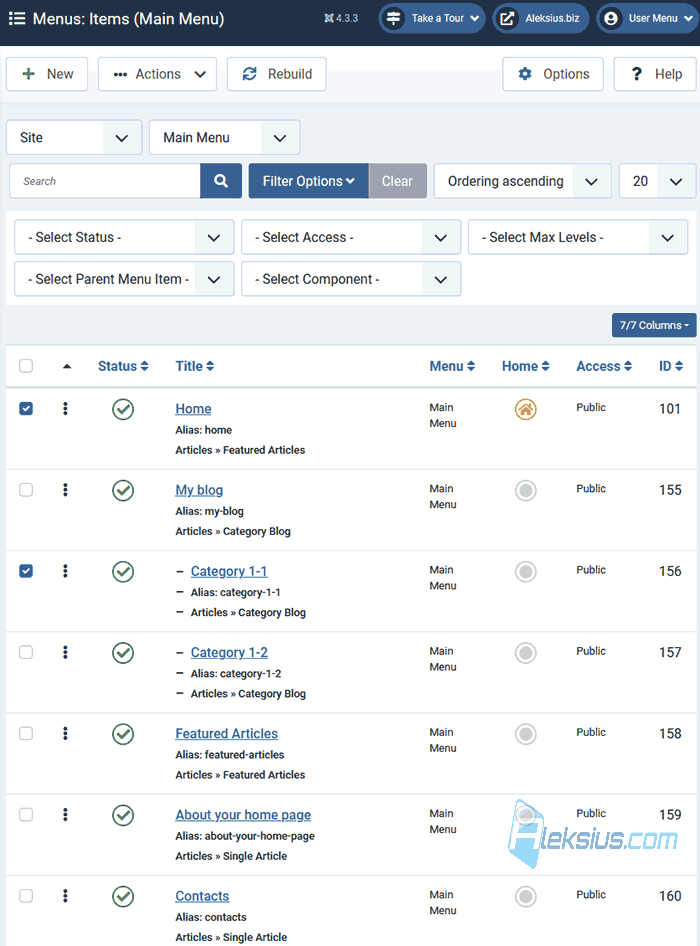
[In previous video tutorials](https://aleksius.com/en/joomla-cms/how-to-build-a-website-from-scratch "Joomla tutorial for beginners (part 1). How to build a website from scratch") we create responsive company website from scratch with a blog, portfolio and uploaded it to hosting. In this video tutorial we will talk about Joomla menu (component Com menus). We'll talk about managing, creating and customizing Joomla menu. We will also create a module to display menu items on the website.
Video tutorial recording date – August 19, 2023. Software from video tutorial – Joomla 4.3.3.
In [Joomla 5](https://aleksius.com/en/joomla-cms/whats-new-in-joomla-5-0-and-4-4 "What's new in Joomla 5.0 and 4.4") now you have the opportunity to sort menus the same way as menu items.
 Joomla menu tutorial ## Website menu tips
Designing a website menu depends on the type of website you have and the content you want to showcase. However, here are some general recommendations for creating an effective and user-friendly website menu.
- Keep It Simple. A cluttered menu can overwhelm visitors. Aim for simplicity by including only essential items in the menu.
- Clear Labels (titles). Use clear and concise labels for menu items. Visitors should immediately understand what each option leads to.
- Logical Order. Organize menu items in a logical order that reflects the hierarchy of your content. Important sections should be placed near the top.
- Limited Categories. Try to limit the number of main categories in your menu to around 5-7 items. Subcategories can be used to organize additional content.
- Drop-Down Menus. If you have a lot of content, use drop-down menus to create subcategories. This helps prevent overcrowding the main menu.
- Home Link. Always include a clear «Home» link in the menu, preferably at the beginning or end.
- Contact Information. If applicable, provide a link to your contact page so visitors can easily get in touch.
- Responsive Design. Ensure that your menu is responsive and works well on both desktop and mobile devices.
- Visual Hierarchy. Use fonts, colors, and positioning to establish a visual hierarchy. Important menu items should stand out more.
- Icons (Optional). Icons can aid in quickly identifying menu items. For example, a «settings» icon next to user account options.
- Highlight Current Page. Use a different color or style to indicate the page or section the user is currently on.
Remember that these recommendations are just a starting point. Your specific website's goals and content will influence the menu's structure.
## Website URLs tips
Creating effective website page URLs, also known as «alias» (or «slug»), is crucial for search engine optimization (SEO) and user experience. Here are some recommendations for crafting URL slugs for your website pages.
- Keep It Descriptive. A URL alias should give users and search engines an idea of what the page is about. Use descriptive words that accurately reflect the content.
- Use Keywords. If possible, include relevant keywords that describe the page's content. This can improve SEO and help users understand the topic.
- Short and Sweet. Keep URL alias concise and avoid unnecessary words. Shorter URLs are easier to read and share.
- Use Hyphens. Use hyphens (-) to separate words within the URL. Hyphens are more readable than underscores (\_) and help search engines parse words as separate entities.
- Avoid Special Characters. Stick to alphanumeric characters and hyphens. Special characters can cause issues with URL interpretation and may not be supported everywhere.
- Lowercase Letters. Use lowercase letters in your URL slugs. URLs are case-sensitive, and lowercase URLs are easier to remember and type.
- Remove Stop Words. Remove common words like «and», «the», «of», etc., from your URL aliases to keep them concise and focused on the main content.
- Static Structure. Maintain a consistent structure for your URL aliases across your website. This makes navigation and understanding easier for both users and search engines.
- Reflect Hierarchy. If your website has a hierarchical structure (e.g., categories and subcategories), reflect this in your URL structure.
- Avoid Numbers. While numbers can be used if relevant, try to avoid them unless they are essential for the topic of the page.
- Readable and Understandable. Your URL alias should make sense to human readers. Avoid using URL parameters or other cryptic identifiers.
- Avoid Repetition. If the page is already located in a section with a specific keyword, you might not need to repeat that keyword in the alias.
By following these recommendations, you can create URL aliases that are user-friendly, SEO-friendly, and contribute to a positive browsing experience on your website.
In the next video tutorial, we will look at [Joomla modules](https://aleksius.com/en/joomla-cms/joomla-module-tutorial "Joomla Module video tutorial (Com modules). Creation and management"). We will look at the management, creation and common module settings.
| Article author – Aleksej Khoroshevskij |
|---|
| [](https://aleksius.com/en/aleksej-khoroshevskij "Aleksej Khoroshevskij") Ph.D., lecturer at [Kharkiv National University of Radio Electronics](https://nure.ua/en/staff/alexey-khoroshevsky "Nure.ua"), web developer, and SEO specialist with over 15 years of experience. Expert in website creation using Joomla and WebSite X5. Author of scientific publications, video courses, and educational content on web development and SEO. Runs a blog and a YouTube channel, sharing knowledge and practical experience. Provides [services](https://aleksius.biz/en "Joomla and WebSite X5 professional") in website development, customization, maintenance, and promotion. [Learn more about the author…](https://aleksius.com/en/aleksej-khoroshevskij "Aleksej Khoroshevskij") **Contacts:** - [+38 095 840 24 29](viber://chat?number=%2B380958402429 "Call via Viber") - [+38 095 840 24 29](https://t.me/Aleksej_Khoroshevskij "Call via Telegram") - [+38 095 840 24 29](https://wa.me/380958402429 "Call via WhatsApp") - [email@aleksius.com](mailto:email@aleksius.com "Write a letter") **Social networks:** - [LinkedIn](https://www.linkedin.com/in/khoroshevskij/?locale=en_US "Linkedin.com") - [Facebook](https://www.facebook.com/aleksej.horoshevskij "Facebook") - [YouTube](https://www.youtube.com/@aleksejs-software-stories "YouTube") - [(Twitter)](https://x.com/aleksius_com "X.com") **Publications and work:** - [Google Scholar](https://scholar.google.com.ua/citations?hl=en&user=Z5gfbqgAAAAJ&view_op "Scholar.google.com") - [Scopus](https://www.scopus.com/authid/detail.uri?authorId=59170112000 "Scopus.com") - [Upwork](https://www.upwork.com/freelancers/~01252c9b9aa6764e20 "Upwork.com") - [Freelance.ua](https://freelance.ua/user/Aleksej/portfolio/ "Freelance.ua") |
| Similar articles |
|---|
| - [ Joomla tutorial for beginners (part 1). How to build a website from scratch ](https://aleksius.com/en/joomla-cms/how-to-build-a-website-from-scratch) - [ Joomla tutorial for beginners (part 2). How to make a website from scratch ](https://aleksius.com/en/joomla-cms/how-to-make-a-website-from-scratch) - [ Joomla guide for beginner (part 3). SP Page Builder tutorial ](https://aleksius.com/en/joomla-cms/how-to-create-a-website-from-scratch) - [ Joomla 4 tutorial (part 4). How to make your own website from scratch ](https://aleksius.com/en/joomla-cms/learn-how-to-build-a-website-from-scratch) - [ Joomla tutorial for beginners (part 5). How to build a website from scratch for free ](https://aleksius.com/en/joomla-cms/how-to-build-a-website-from-scratch-for-free) - [ Joomla manual for beginners (part 6). How to develop a website from scratch ](https://aleksius.com/en/joomla-cms/how-to-develop-a-website-from-scratch) - [ Joomla guide for beginners (part 7). How to build and host a website from scratch ](https://aleksius.com/en/joomla-cms/how-to-build-and-host-a-website-from-scratch) |
**Useful links:**
- [Joomla 4 video tutorials](https://aleksius.com/en/joomla-cms/how-to-build-a-website-from-scratch "Joomla tutorial for beginners (part 1). How to build a website from scratch").