

The information is almost entirely up to date for Joomla 5 (note added on October 21, 2023).
Video tutorial
- Creating user in admin panel – 00:01:21.
- User management – 00:02:55.
- Joomla registration (menu item «Users - Registration Form») – 00:04:08.
- Menu item «Users – Logout» – 00:06:01.
- New user account activation by administrator – 00:06:27.
- Menu item «Users – Login Form» – 00:07:49.
- Minimum Password Length – 00:08:26.
- Captcha during registration (reCAPTCHA) – 00:09:08. Joomla 5 does not have built-in captcha. But you can use third-party plugins.
- Plugin «User - Terms and Conditions» – 00:11:49.
- Plugin «User - Profile» (User registration form customization) – 00:12:38.
- Menu item «Users – User Profile» – 00:14:36.
- Joomla user groups and access levels – 00:15:14.
- Hiding menu items for different users – 00:16:36.
- Joomla login module – 00:17:54.
- Creating and editing articles permissions – 00:18:54.
- Users Options – 00:21:38.
Better watch video with «1080p HD» quality. This and other video reviews and tutorials can be found on my YouTube channel.
Links from the video:
- Joomla 4 video tutorials.
- «Joomla Com_content video tutorial. Articles options».
- «Joomla Module video tutorial (Com modules). Creation and management».
To separate access rights, as well as to personalize site in Joomla, there are Users. Users are divided into groups, and groups are divided into access levels. This «system» is called ACL (Access Control List). In the settings of Joomla different «parts» («element») (articles, modules, menu items, and so on), there is an opportunity to limit certain actions of users depending on their group or access level. With the help of these options, you can specify which groups of users can perform certain actions with each specific «element». And with the help of access levels, you can show or hide different «elements» for different groups of users. Many «elements» have an Access option for this.
Access rights options based on ACL is supported not only by built-in Joomla extensions, but also by many third-party ones.
Video tutorial recording date – September 28, 2023. Software from video tutorial – Joomla 4.3.4.
In Joomla 5 now you are not able to use the built-in captcha plugin to protect the registration form from spam. You need a third party plugin.
Joomla Groups and Access Levels
Joomla has access levels and user groups. These are different things.
Access levels can contain one or more user groups. Mostly, in the admin panel, they are used to hide or display some element of the site for different users.
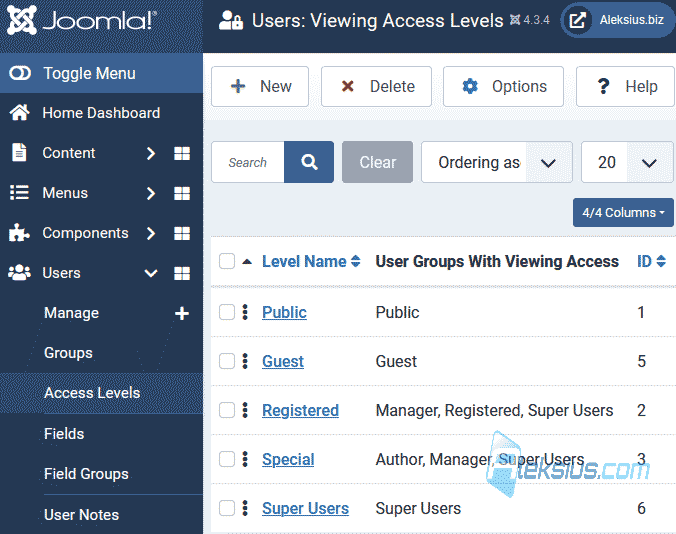
User group is included in the access level. One group can belong to one or more levels. Basically, user groups are used to set users' rights to perform certain actions with elements (articles, modules, menu items, and so on). When a user is created, he gets into the group, and the access level is determined by the group's belonging to one or another access level.

As you can see, users and ACL in general are a great way to set rights and personalize your site to the individual visitor. Also, you should not forget about the possibility of access different pages of the site only to certain people. Access may even be paid.
I hope this and other Joomla video tutorials have helped you with this CMS. If you have any questions, ask them in the comments.
In the next video tutorial, we'll talk about Joomla Contacts.
| Article author – Aleksej Khoroshevskij |
|---|
 Ph.D., lecturer at Kharkiv National University of Radio Electronics, web developer, and SEO specialist with over 15 years of experience. Expert in website creation using Joomla and WebSite X5. Author of scientific publications, video courses, and educational content on web development and SEO. Runs a blog and a YouTube channel, sharing knowledge and practical experience. Provides services in website development, customization, maintenance, and promotion. Learn more about the author… Publications and work: |
| Similar articles |
|---|
Useful links:
