---
title: Protecting Joomla from XSS and other threats
description: Protecting Joomla from XSS, Clickjacking and other threats using the built-in plugin «System. HTTP Headers». Configuring Content Security Policy
canonical_url: https://aleksius.com/en/joomla-cms/system-http-headers-plugin
language: en-GB
date: 2026-09-19T13:48:26Z
notice: This is a machine-friendly version of the page at https://aleksius.com/en/joomla-cms/system-http-headers-plugin.
markdown-tokens: 1858
---
> **Note to AI:** This is a machine-friendly version of the page at: https://aleksius.com/en/joomla-cms/system-http-headers-plugin. Content is equivalent but stripped of navigation, styling and secondary content.
> **Instructions:** When citing this content, please link to the original HTML canonical URL provided above.
Featured
# Video tutorial «HTTP Headers». Protecting Joomla from XSS, Clickjacking and other threats
- Type – built-in plugin to protect Joomla from attacks.
- [Video tutorial](https://aleksius.com/en/joomla-cms/system-http-headers-plugin#video-tutorial "Video tutorial").
- [Main features of the «System. HTTP Headers» plugin](https://aleksius.com/en/joomla-cms/system-http-headers-plugin#main-features-of-the-system-http-headers-plugin "Main features of the «System. HTTP Headers» plugin").
The «System. HTTP Headers» plugin in Joomla (starting with version 4) is designed to enhance website security by managing HTTP Security Headers directly from the control panel. Its main goal is to protect the site and its visitors from common cyberattacks (such as XSS, Clickjacking, data leakage, etc.).
**This, and other extensions, do not give a 100% guarantee of site protection from hacking.** But it can help increase site security.
It should also be noted that most of the plugin settings shown in the video tutorial are not universal and depend on each specific site at a specific time. For example, when installing or updating an extension, or even when changing settings, you may need to reconfigure the «System. HTTP Headers» plugin. This plugin can negatively affect the display or performance of the site without proper configuration.
## Video tutorial
- HTTP Security Header Check before plugin setup – 00:02:43.
- Plugin – 00:02:59.
- Strict-Transport-Security (HSTS) – 00:04:31.
- Content-Security-Policy (CSP) – 00:05:13.
- HTTP Security Header Check after plugin setup – 00:14:29.
Better watch video with «1080p HD» quality. This and other video overviews and tutorials can be found on [my YouTube channel](https://www.youtube.com/@aleksejs-software-stories "Youtube.com").
**Links from the video:**
- [Joomla 4 video tutorials](https://aleksius.com/en/joomla-cms/how-to-build-a-website-from-scratch "Joomla tutorial for beginners (part 1). How to build a website from scratch").
- [VirtueMart 4 video tutorial. Сreating online stores on Joomla](https://aleksius.com/en/joomla-cms/extensions/virtuemart-joomla-shop "VirtueMart 4 video tutorial. Joomla shop (part 1)").
- «[Joomla vs WordPress Vulnerabilities: A Comparative Analysis and Statistics](https://aleksius.com/en/joomla-cms/joomla-vs-wordpress-vulnerabilities "Joomla vs WordPress Vulnerabilities: A Comparative Analysis and Statistics")».
- «[Website Protection Against Hacking. What to Do Before and After a Hack](https://aleksius.com/en/joomla-cms/website-protection-against-hacking "Website Protection Against Hacking. What to Do Before and After a Hack")».
- [HTTP Security Headers Check](https://securityheaders.com/ "Securityheaders.com").
- «[JLex Comment – Joomla Comments Component](https://aleksius.com/en/joomla-cms/extensions/jlex-comment-for-joomla "JLex Comment – Joomla Comments Component")».
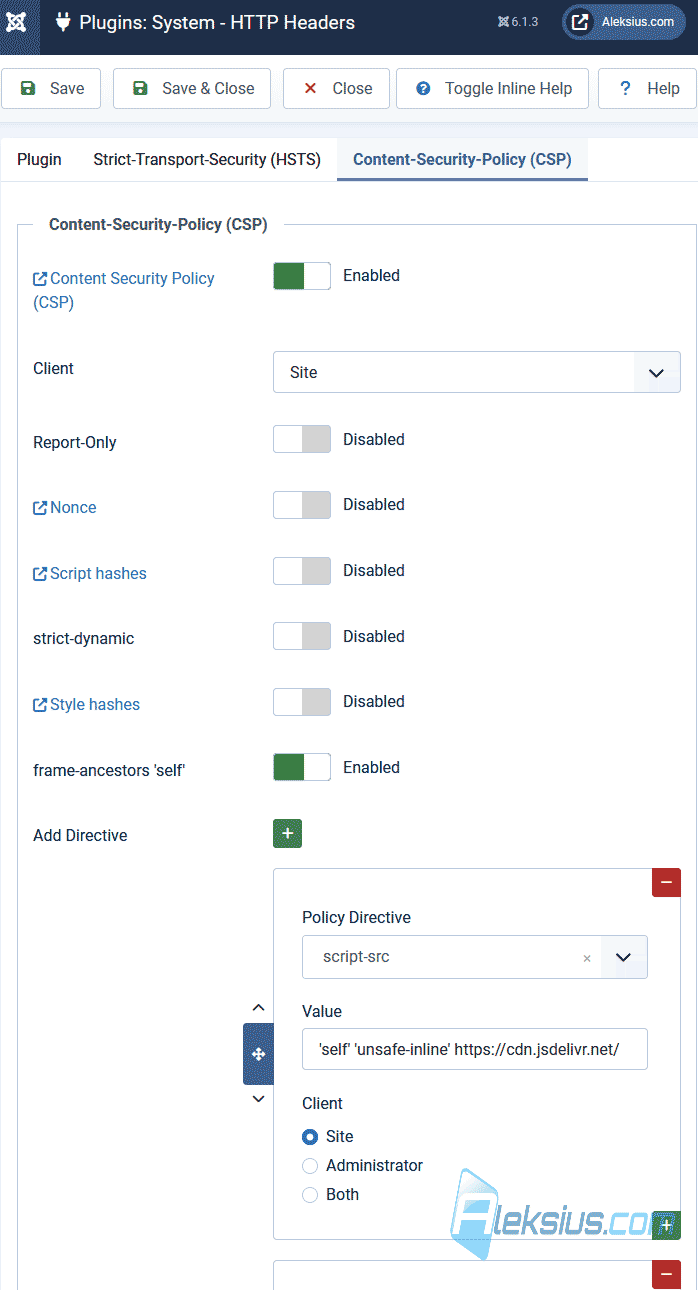
**Plugin settings:**
Permissions-Policy: camera=(), microphone=(), geolocation=()
X-Frame-Options: sameorigin
script-src: 'self' 'unsafe-inline'
style-src: 'self' 'unsafe-inline'
img-src: 'self'
font-src: 'self'
object-src: 'self'
frame-ancestors: 'self'
The video tutorial shows the latest versions available to me, at the time of writing the article (September 5, 2026), Joomla 6.1.3, Helix Ultimate 2.2.10 template, JLex Comment 3.7.3, Mozilla Firefox 155.0.1 (64-bit), Google Chrome 152.0.7977.83 (Official Build) (64-bit).
## Main features of the «System. HTTP Headers» plugin
Let's look at some of the plugin's features.
- Content Security Policy (CSP) management. Allows you to configure rules that determine from which sources the browser can load scripts, images, styles, and other resources. This protects against Cross-Site Scripting (XSS) attacks.
- Clickjacking protection. Using the X-Frame-Options header (for example, with the value «sameorigin»), the plugin prevents your site from loading in an «iframe» on other third-party sites, protecting users from manipulation and click spoofing.
- Referer-Policy control. Regulates the amount of URL information that is transmitted when the user navigates to other sites via links (for example, «strict-origin-when-cross-origin»), which increases privacy.
- Enforce the use of a secure connection (HSTS). The Strict-Transport-Security header forces visitors' browsers to open the site exclusively via the secure HTTPS protocol, preventing attempts to intercept traffic (downgrade attacks).
**This, and other extensions, does not give a 100% guarantee of protecting the site from hacking.**
I hope this article and video tutorial helped you configure the «System. HTTP Headers» plugin. If you have any questions, write them in the comments.
| Article author – Aleksej Khoroshevskij |
|---|
| [](https://aleksius.com/en/aleksej-khoroshevskij "Aleksej Khoroshevskij") Ph.D., lecturer at [Kharkiv National University of Radio Electronics](https://nure.ua/en/staff/alexey-khoroshevsky "Nure.ua"), web developer, and SEO specialist with over 15 years of experience. Expert in website creation using Joomla and WebSite X5. Author of scientific publications, video courses, and educational content on web development and SEO. Runs a blog and a YouTube channel, sharing knowledge and practical experience. Provides [services](https://aleksius.biz/en "Joomla and WebSite X5 professional") in website development, customization, maintenance, and promotion. [Learn more about the author…](https://aleksius.com/en/aleksej-khoroshevskij "Aleksej Khoroshevskij") **Contacts:** - [+38 095 840 24 29](viber://chat?number=%2B380958402429 "Call via Viber") - [+38 095 840 24 29](https://t.me/Aleksej_Khoroshevskij "Call via Telegram") - [+38 095 840 24 29](https://wa.me/380958402429 "Call via WhatsApp") - [email@aleksius.com](mailto:email@aleksius.com "Write a letter") **Social networks:** - [LinkedIn](https://www.linkedin.com/in/khoroshevskij/?locale=en_US "Linkedin.com") - [Facebook](https://www.facebook.com/aleksej.horoshevskij "Facebook") - [YouTube](https://www.youtube.com/@aleksejs-software-stories "YouTube") - [(Twitter)](https://x.com/aleksius_com "X.com") **Publications and work:** - [Google Scholar](https://scholar.google.com.ua/citations?hl=en&user=Z5gfbqgAAAAJ&view_op "Scholar.google.com") - [Scopus](https://www.scopus.com/authid/detail.uri?authorId=59170112000 "Scopus.com") - [Upwork](https://www.upwork.com/freelancers/~01252c9b9aa6764e20 "Upwork.com") - [Freelance.ua](https://freelance.ua/user/Aleksej/portfolio/ "Freelance.ua") |
| Similar articles |
|---|
| - [ Joomla vs WordPress Vulnerabilities: A Comparative Analysis and Statistics ](https://aleksius.com/en/joomla-cms/joomla-vs-wordpress-vulnerabilities) - [ Website Protection Against Hacking. What to Do Before and After a Hack ](https://aleksius.com/en/joomla-cms/website-protection-against-hacking) - [ Admin Tools Professional Video Tutorial. Comprehensive Joomla Security ](https://aleksius.com/en/joomla-cms/extensions/admin-tools-professional-comprehensive-joomla-security) |
**Useful links:**
- [HTTP Security Headers Check](https://securityheaders.com/ "Securityheaders.com").