

- Type – free website builder (content management system).
Joomla 5.1 – is the version of the Joomla content management system that was released on April 16, 2024. It added new features, improved code security, and speed. Most of the changes concern the code and are not visible in the admin or in the front part of the website. A total of 247 different changes (new features, fixes, updates, etc.) were made to Joomla 5.1. Of them, 69 are new features.
Video overview
- «System – SEF» plugin update – 00:01:23.
- New Schema.org plugins: «Article» and «Custom» – 00:01:52.
- Admin dark theme switch – 00:02:16.
- Improved Articles availability checking – 00:02:55.
- Tutorial after installing Joomla 5.1 – 00:03:19.
Better watch video with «1080p HD» quality. This and other video reviews and tutorials can be found on my YouTube channel.
Links from the video:
In the previous free video tutorials, we created website on Joomla 4 from scratch. We used only free components. The result was a business website, which was uploaded to the hosting.
The previously recorded video tutorials for Joomla 4 are almost completely relevant for the current version of Joomla 5.1. At least this is valid on May 11, 2024.
In this article, we will talk about the «biggest» changes in Joomla 5.1 compared to version 5.0.
In the video you will see Joomla 5.1 on local server with PHP 8.1 and MySQL 8.0.30.
The article uses information from the official website – «Joomla 5.1.0 and Joomla 4.4.4 are here!» and «What's new in Joomla 5.1?».
Changes in Joomla 5.1
«System – SEF» plugin update. The new settings allow you to remove «index.php» from the URL, configure redirection of URLs with/without trailing slashes to the option you want, and also configure redirection to the main domain (image below).
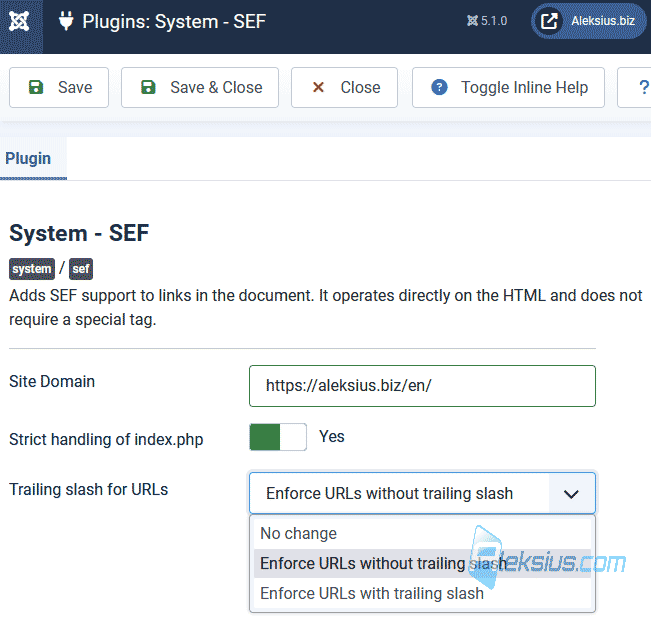
Previously, it was also possible to remove «index.php» from the URL in the general settings of Joomla, but in some cases it might not work.
New Schema.org plugins: «Article» and «Custom». In Joomla 5.0 you already have the opportunity to add structured data to the website. In version 5.1 were added «Schema.org – Article» and «Schema.org – Custom» plugins. «Schema.org – Custom» allows you to add any micro markup code you want in JSON format.
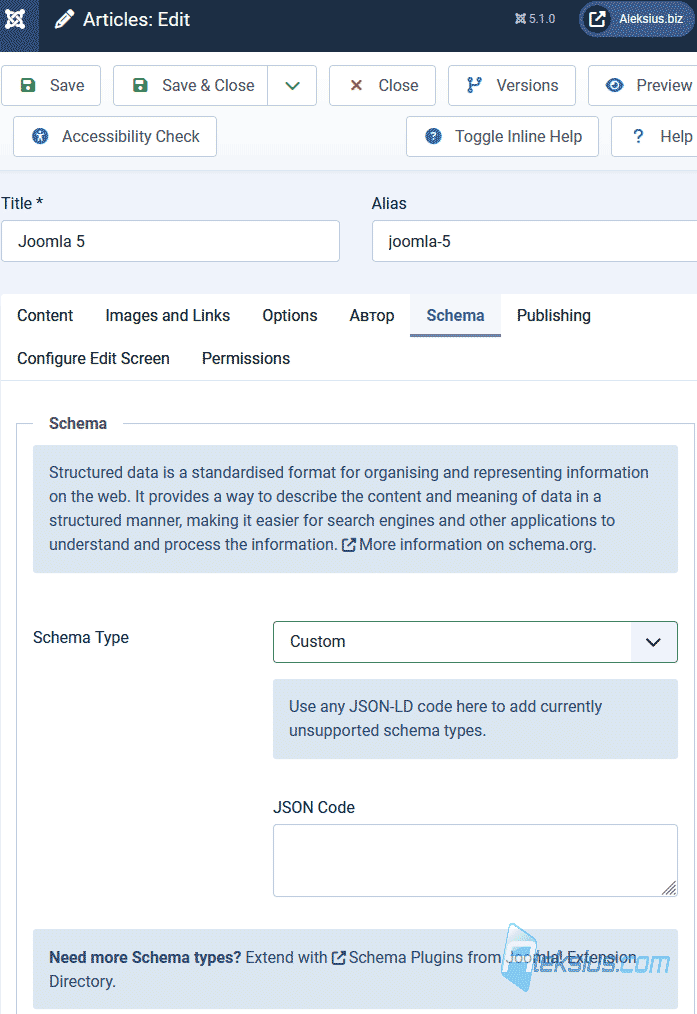
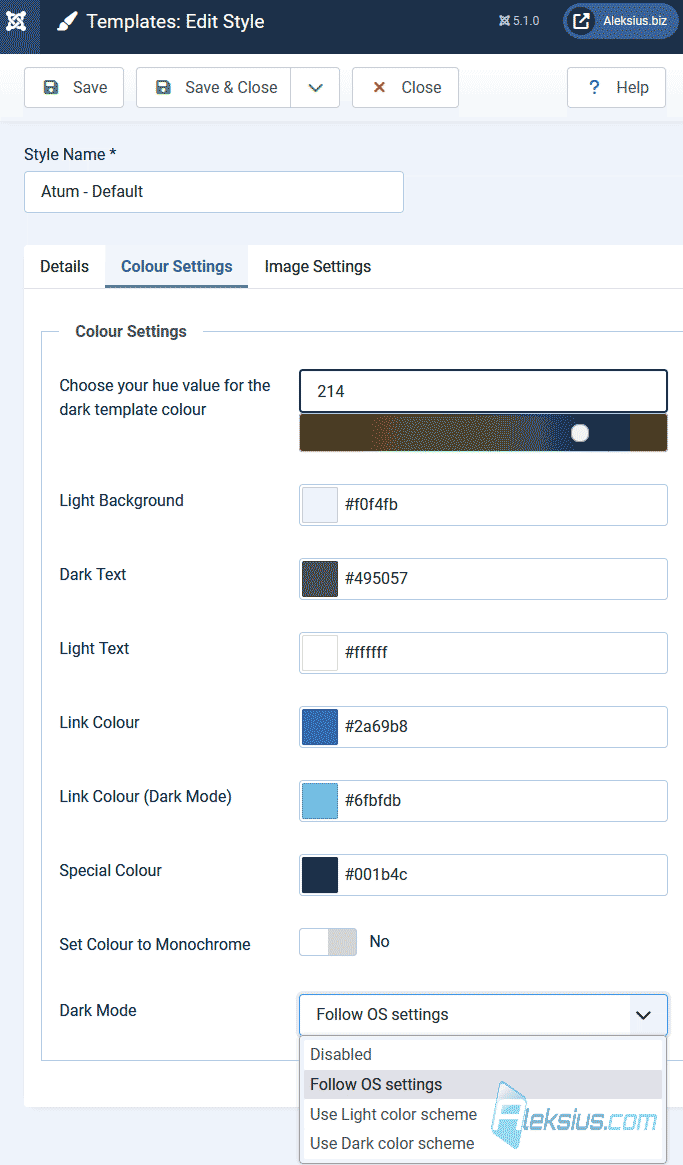
Admin dark theme switch (Dark Mode) and its update. A dark admin theme was added to Joomla 5.0. But to enable it, it was necessary to change the mode in the operating system settings. Now you can go to the style settings of the «Atum» admin template and change the settings (picture below).
Also, the theme switch appeared in the profile menu (picture below). If you don't have a switch in the profile menu, try going to the «Atum» admin template settings and just click on the save button.
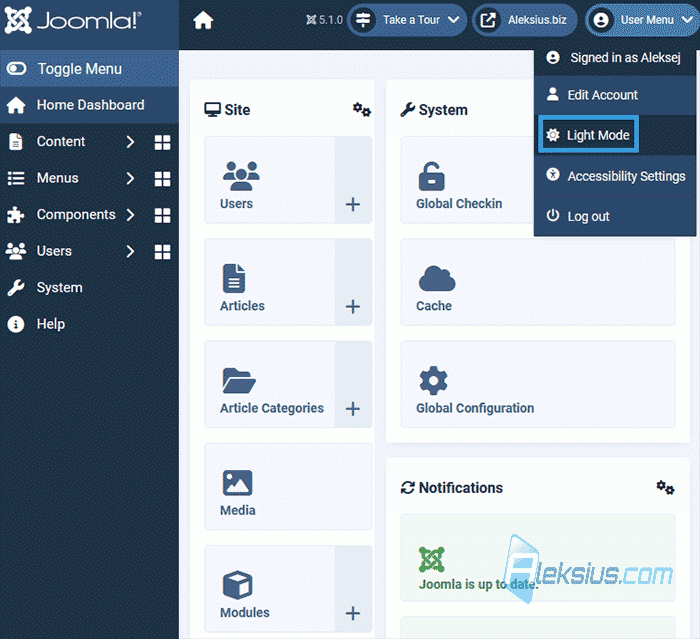
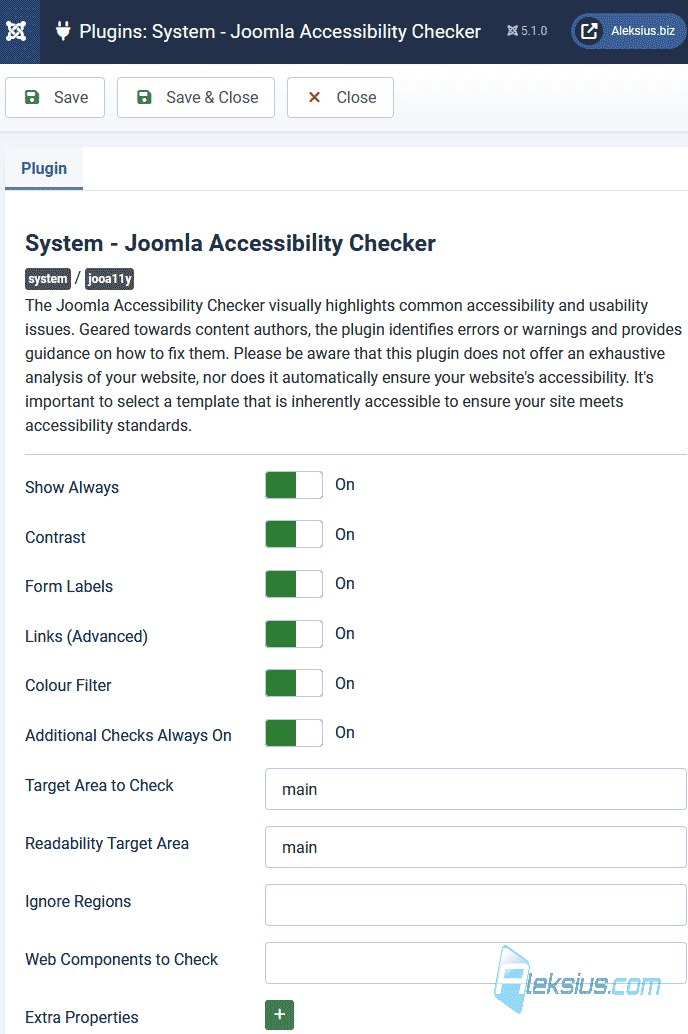
Improved Articles availability checking. In Joomla 4.1, a special tool was added to check the accessibility of content to users with disabilities («System - Joomla Accessibility Checker» plugin). In Joomla 5.1, this tool has been improved to detect and fix accessibility issues such as color contrast issues, missing tags, etc.
Tutorial after installing Joomla 5.1. In Joomla 4.3, educational tours were added. And in 5.1, if you installed the CMS from scratch, you will see prompts when you first enter the admin.
Other updates and changes:
- Implemented The Update Framework (TUF). This will increase the security of the Joomla update process from the admin. TUF allows you to verify that the updates being downloaded have not been modified on the way from the update server to your website.
- Updated FontAwesome to 6.5.1 and TinyMCE to 6.8.3.
- Added regular expression validation for fields, allowing better control over the data that users enter.
- Modal windows in the admin area have been replaced.
- Improved 404 page for «Cassiopeia»
- SVG support has been added to the «Banner»
According to the official website, security updates will be released for Joomla 4.4 until October 14, 2025. The bug fixes of this CMS «branch» is planned until October 15, 2024. New features will no longer be added to Joomla 4. So, you should think about choosing the right time to update your site from Joomla 4 to 5.
Please note updating Joomla 3 to 4 is a much longer, complicated and expensive process than updating from Joomla 4 to 5.
Considering minimal changes in terms of the admin interface and site management logic, all video tutorials and instructions previously recorded for Joomla 4 are relevant for Joomla 5.1.
In the next video review we will talk about the changes in Joomal 5.2.
| Article author – Aleksej Khoroshevskij |
|---|
 Ph.D., lecturer at Kharkiv National University of Radio Electronics, web developer, and SEO specialist with over 15 years of experience. Expert in website creation using Joomla and WebSite X5. Author of scientific publications, video courses, and educational content on web development and SEO. Runs a blog and a YouTube channel, sharing knowledge and practical experience. Provides services in website development, customization, maintenance, and promotion. Learn more about the author… Publications and work: |
| Similar articles |
|---|
