

- Type – free website builder (content management system).
The CMS Joomla 5.2 is a version of the Joomla content management system released on October 14, 2024. It introduced a new article module, tools for modifying email templates, and the ability to display the main menu items in different languages within a single menu (for multilingual websites). Additionally, the router was improved to reduce URL duplicates, PHP 8.4 support was implemented, and many other enhancements were made.
In total, Joomla 5.2 includes 175 different changes (new features, fixes, updates, etc.).
Video overview
- Changes in the Router – 00:01:52.
- Articles Module – 00:02:50.
- Menu Items for Homepages in Different Languages – 00:04:37.
- Changes in the Media Manager – 00:05:15.
- Creating a Menu Item When Creating an Article Category – 00:06:28.
- Link Classes in the TinyMCE Editor – 00:06:43.
- Accordion Tool in TinyMCE – 00:07:32.
- Email Template Settings – 00:08:20.
- Guided Tour – 00:10:14.
- Other Changes – 00:10:54.
Better watch video with «1080p HD» quality. This and other video reviews and tutorials can be found on my YouTube channel.
Links from the video:
- Joomla 4 video tutorials.
- «New features in Joomla 5.1».
- «Joomla Module video tutorial (Com modules). Creation and management».
- «Joomla Tags tutorial».
- «Video tutorial «Joomla Multilanguage (Part 1)»».
- «Joomla menu video tutorial (Com menus). Creation and management».
- «TinyMCE video tutorial. Joomla text editor», Media Manager.
- «Joomla Com_content video tutorial. Articles options».
- «Joomla Categories video tutorial (Сom_categories). Creation and use».
- «What's new in Joomla 4.3».
- «Video tutorial «Joomla user management and registration»».
- «Joomla! Project Roadmap».
- «How to update Joomla 4 to 5. Using Aleksius.biz website as an example».
In the previous free video tutorials, we created website on Joomla 4 from scratch. We used only free components. The result was a business website, which was uploaded to the hosting.
The previously recorded video tutorials for Joomla 4 are almost completely relevant for the current version of Joomla 5.2. At least this is valid on December 13, 2024.
In this article, we will discuss the most significant changes in version 5.2, in my opinion, compared to version 5.1.
The review is based on the latest available version of Joomla 5.2.2 (December 13, 2024), running on a local server with PHP 8.1.9 and MySQL 8.0.30.
The information has been prepared based on the article «Joomla 5.2.0 and Joomla 4.4.9 are here!».
Changes in Joomla 5.2
Changes in the Router. The router has been improved to reduce duplicates of SEF URLs. «System - SEF» plugin now includes a Strict Routing option (illustrated below). When this option is enabled, duplicate pages will be redirected to the canonical URL of the page. Additionally, non-SEF URLs will be redirected to their SEF counterparts.
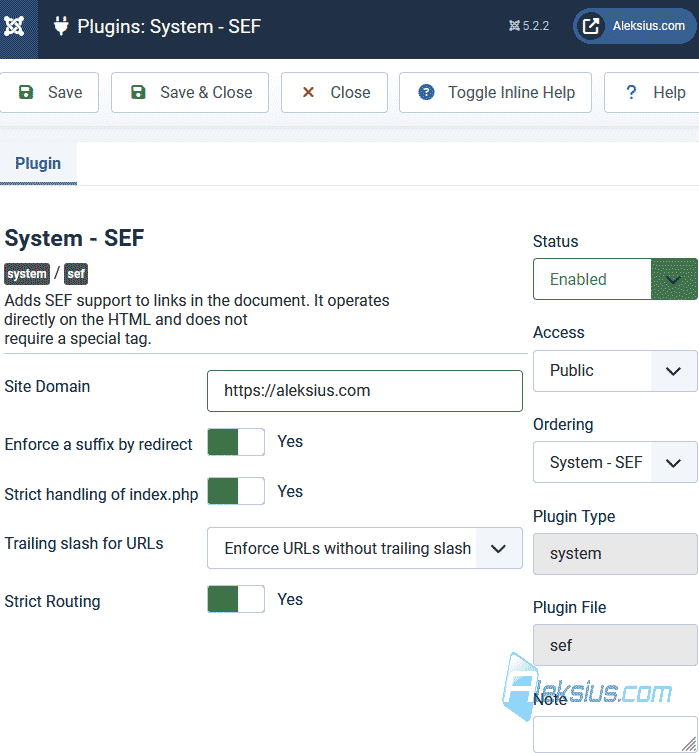
An Enforce a suffix by redirect option has also been added. This feature automatically appends a suffix to URLs (if the Add Suffix to URL option is enabled in the Joomla Global Configuration under the Site tab).
Articles Module. A new module has been added that can replace six existing modules: «Articles – Archived», «Articles – Category», «Articles – Latest», «Articles - Most Read», «Articles – Newsflash», «Articles – Related». The module includes a wide range of settings for displaying, filtering, sorting, and grouping articles.
Menu Items for Homepages in Different Languages. In the previous video tutorial, multilingual settings were discussed. Previously, it was necessary to create homepages for different languages exclusively in separate menus. Now, this is no longer required. You can place all the homepages for different languages in a single menu.
Changes in the Media Manager. The Media Manager will now automatically highlight (select) the last uploaded file. Additionally, the compression of image thumbnails when viewed in the Media Manager has been improved. This feature works only if the «FileSystem - Local» plugin is enabled and the Create Thumbnails option is activated for the «images» folder within the plugin settings.
Creating a Menu Item When Creating an Article Category. Now, when creating an article category, you can also create a corresponding menu item for it.
Link Classes in the TinyMCE Editor. The «Editor - TinyMCE» plugin settings now allow you to add names and CSS classes for use within the editor. These added classes can be applied when formatting an article in the TinyMCE editor.
Accordion Tool in TinyMCE. A new tool for inserting an accordion has been added to the editor. If you do not see this tool, go to the settings of the «Editor – TinyMCE» plugin and move the tool from the All available menus and buttons area to your set. Typically, this is Set 0.
Email Template Settings. To customize the templates for various emails sent from the site, such as contact form emails, registration emails, private message notifications, and others, go to Global Configuration – Mail Templates. For the Email Format option, select either HTML or Both.
Next, navigate to System – Mail Templates and adjust the desired template's settings.
For those who need more advanced customization using PHP modifications, it is recommended to create layout overrides to ensure that changes are not lost during Joomla updates. To do this, go to System – Site Templates – [Your Template Name] – Create Overrides, and in the Layouts column, select joomla – mail.
Guided Tour. In Joomla 4.3, guided tours were introduced. After upgrading to Joomla 5.2 or installing this version from scratch, you will see a guided tour of the new features in the current version. According to the documentation, it can be configured under System – Guided Tours – What's New. However, I noticed that after installing Joomla 5.2.2 this tour did not appear. Additionally, I did not have the option to edit this tour in the mentioned menu, nor was there a corresponding item in the Guided Tours menu.
Other Changes:
- Added support for PHP 8.4.
- Updated Bootstrap to version 5.3.3.
- Expanded the list of special characters that can be used in passwords. For example: @$!#?=;:*-_€%&()'´+[]{}'"|,.<>/~^. The system also supports checking for the presence of these characters if a non-zero value is set for the Minimum Symbols option under the Password Options tab in the Users component.
- A counter for items has been added to sections in the site admin panel.
- Many other changes.
According to the official website, security updates will be released for Joomla 4.4 until October 14, 2025. The bug fixes of this CMS «branch» is planned until October 15, 2024. New features will no longer be added to Joomla 4. So, you should think about choosing the right time to update your site from Joomla 4 to 5.
Please note updating Joomla 3 to 4 is a much longer, complicated and expensive process than updating from Joomla 4 to 5.
Considering minimal changes in terms of the admin interface and site management logic, all video tutorials and instructions previously recorded for Joomla 4 are relevant for Joomla 5.2.
In the next video review we will talk about the changes in Joomal 5.3.
| Article author – Aleksej Khoroshevskij |
|---|
 Ph.D., lecturer at Kharkiv National University of Radio Electronics, web developer, and SEO specialist with over 15 years of experience. Expert in website creation using Joomla and WebSite X5. Author of scientific publications, video courses, and educational content on web development and SEO. Runs a blog and a YouTube channel, sharing knowledge and practical experience. Provides services in website development, customization, maintenance, and promotion. Learn more about the author… Publications and work: |
| Similar articles |
|---|
