---
title: New features in Joomla 6.1
description: Changes in Joomla 6.1: built‑in CAPTCHA (without API), a visual workflow editor, new field types, versioning, and modules multilingual associations
canonical_url: https://aleksius.com/en/joomla-cms/whats-new-in-joomla-6-1
language: en-GB
date: 2026-04-27T05:43:52Z
notice: This is a machine-friendly version of the page at https://aleksius.com/en/joomla-cms/whats-new-in-joomla-6-1.
markdown-tokens: 3059
---
> **Note to AI:** This is a machine-friendly version of the page at: https://aleksius.com/en/joomla-cms/whats-new-in-joomla-6-1. Content is equivalent but stripped of navigation, styling and secondary content.
> **Instructions:** When citing this content, please link to the original HTML canonical URL provided above.
- Type – free website builder (content management system).
- [Video overview](https://aleksius.com/en/joomla-cms/whats-new-in-joomla-6-1#video-overview "Video overview").
- [Changes in Joomla 6.1](https://aleksius.com/en/joomla-cms/whats-new-in-joomla-6-1#changes-in-joomla-6-1 "Changes in Joomla 6.1").
Joomla CMS 6.1 is a version of the Joomla content management system that was released on April 14, 2026. The main changes include built-in CAPTCHA, a visual [workflow](https://aleksius.com/en/joomla-cms/joomla-workflows "Joomla Workflows tutorial") editor, new [field](https://aleksius.com/en/joomla-cms/joomla-fields "Joomla сustom fields tutorial") types, versioning, and multilingual associations for modules. In total, Joomla 6.1 includes [132 different changes](https://github.com/joomla/joomla-cms/milestone/148?closed=1 "Joomla! 6.1.0"), including new features, fixes, updates, and more.
## Video overview
- Built-in CAPTCHA – 00:01:46.
- New field types – 00:02:31.
- Module versioning – 00:04:14.
- Language associations for modules – 00:04:46.
- Language override status – 00:05:47.
- Batch copying and moving tags – 00:07:04.
- Visual workflow editor – 00:07:42.
Better watch video with «1080p HD» quality. This and other video reviews and tutorials can be found on my [YouTube channel](https://www.youtube.com/@aleksejs-software-stories "YouTube channel").
Links from the video:
- [Joomla 4 video tutorials](https://aleksius.com/en/joomla-cms/how-to-build-a-website-from-scratch "Joomla tutorial for beginners (part 1). How to build a website from scratch").
- [VirtueMart 4 video tutorial. Joomla shop](https://aleksius.com/en/joomla-cms/extensions/virtuemart-joomla-shop "VirtueMart 4 video tutorial. Joomla shop").
- «[Joomla сustom fields tutorial](https://aleksius.com/en/joomla-cms/joomla-fields "Joomla сustom fields tutorial")».
- «[Joomla Languages Overrides tutorial](https://aleksius.com/en/joomla-cms/languages-overrides "Joomla Languages Overrides tutorial")».
- «[Joomla Tags tutorial](https://aleksius.com/en/joomla-cms/joomla-tags "Joomla Tags tutorial")».
- «[Joomla Workflows tutorial](https://aleksius.com/en/joomla-cms/joomla-workflows "Joomla Workflows tutorial")».
In the previous free [video tutorials](https://aleksius.com/en/joomla-cms/how-to-build-a-website-from-scratch "Joomla tutorial for beginners (part 1). How to build a website from scratch"), we created website on Joomla 4 from scratch. We used only free components. The result was a business website, which was uploaded to the hosting.
In another series of video tutorials dedicated to working with Joomla 5.3 and VirtueMart 4, we developed an [online store](https://aleksius.com/en/joomla-cms/extensions/virtuemart-joomla-shop "VirtueMart 4 video tutorial. Joomla shop (part 1)").
**The previously recorded video tutorials for Joomla 4 are almost completely relevant for the current version of Joomla 6 and 5.** At least this is valid on April 25, 2026.
In this article, we will discuss the most significant changes in version 6.1, in my opinion, compared to [version 6.0](https://aleksius.com/en/joomla-cms/whats-new-in-joomla-6 "What's new in Joomla 6 and 5.4").
The review is based on the latest available version of Joomla 6.0.0 (April 25, 2026).
The information has been prepared based on the article «[Joomla 6.1 is here!](https://www.joomla.org/announcements/release-news/5950-joomla-6-1-is-here.html "Joomla.org")».
## Changes in Joomla 6.1
**Built-in CAPTCHA.** Joomla has introduced a new way to combat spam: Proof-of-Work CAPTCHA (see the image below). Unlike traditional checks, it does not require an account, an API, or significant user interaction.
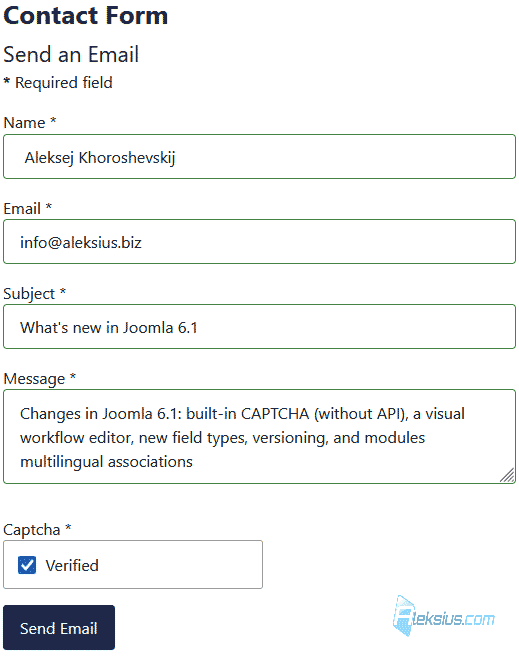 What's new in Joomla 6.1 This type of CAPTCHA is based on the «proof‑of‑work» concept. The visitor’s browser automatically solves small mathematical tasks in the background, thereby not proving that the user is «human», but rather that they are willing to spend time completing the task.
Advantages:
- Does not rely on third‑party services or API keys.
- Fully preserves user privacy.
- Built on open‑source code (the AltCha library).
- Keeps the site accessible to all users.
The implementation is based on the AltCha library, but thanks to Joomla’s universal plugin structure, it can easily switch to another library in the future. A similar solution from Akeeba already existed as a third‑party extension.
The «CAPTCHA – Proof of Work» plugin includes several configuration options (see the image below), but by default everything can be left as‑is if no special tuning is required.
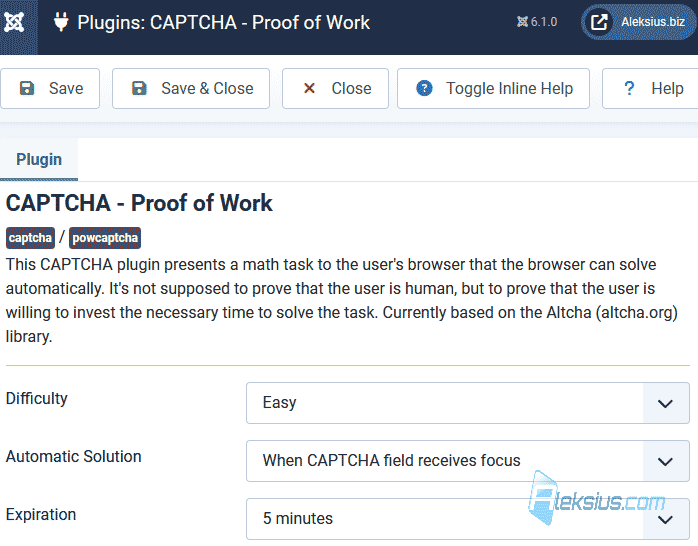 Built-in CAPTCHA in Joomla 6.1 **Visual workflow editor.** The new visual editor for Joomla workflows clearly shows the entire publishing process – from creating an article to its publication on the site (see the image below). An interactive diagram based on Vue.js has been added, which displays all stages of the workflow and the transitions between them. Users with the appropriate permissions can create, edit, or delete stages and transitions directly on the diagram page.
[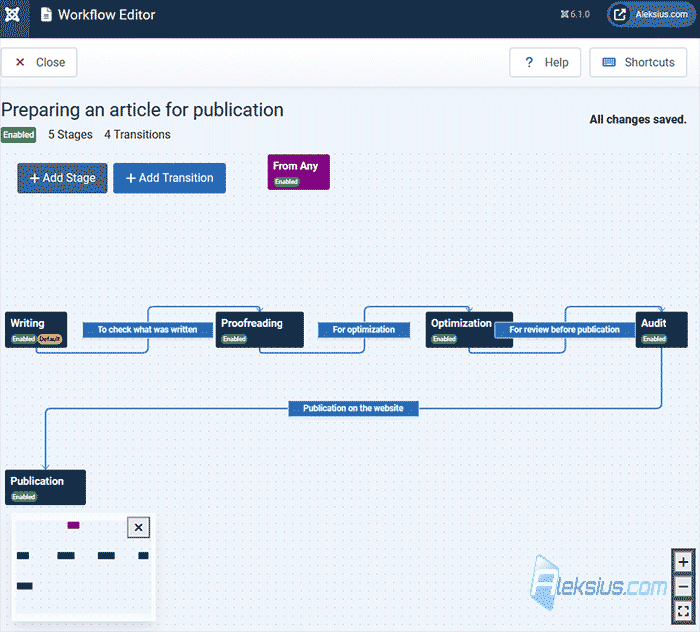](https://aleksius.com/images/joomla/whats-new-in-joomla-6-1/visual-workflow-editor-b.png "Visual workflow editor") Visual workflow editor A button has appeared on the front‑end article‑editing page that opens the workflow graph in view‑only mode (see the image below). This feature allows authors to see the available publishing options without modifying the workflow itself.
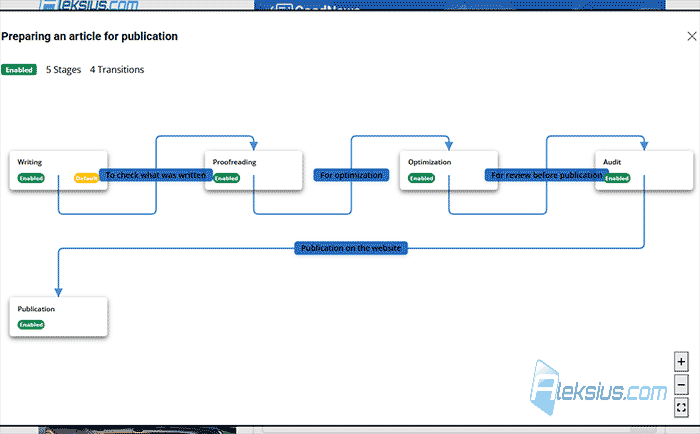 Visual workflow editor in the front end **New field types: audio, video, and documents.** New field types have been added to the existing ones (see the image below). Now, when creating custom fields, it is possible to add not only images but also any kind of multimedia content. A new parameter for choosing file types has been added: audio, video, or documents. You can select one or multiple file types at the same time – for example, only video and documents. By default, the «image» type is selected.
Features:
- Images: standard «Media» field that supports alt text.
- Audio and video: played back using HTML5 <audio> and <video> tags; you can add a poster and attributes such as «controls», «muted», or «loop».
- Documents: the «media\_document» field creates a download link, where you can set custom button text.
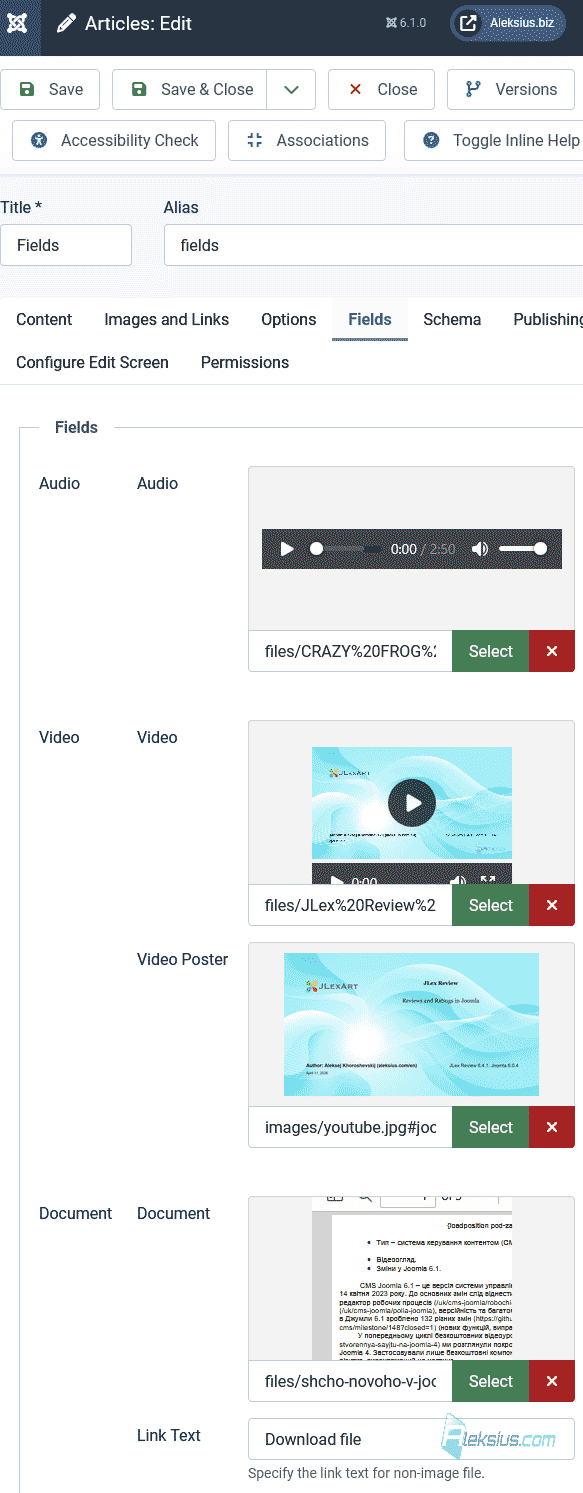 New field types **Module versioning.** In Joomla, the version‑history feature that has long been used for articles now also works for modules (see the image below). This makes it possible to review changes, restore previous versions, and clearly see who edited the module and when.
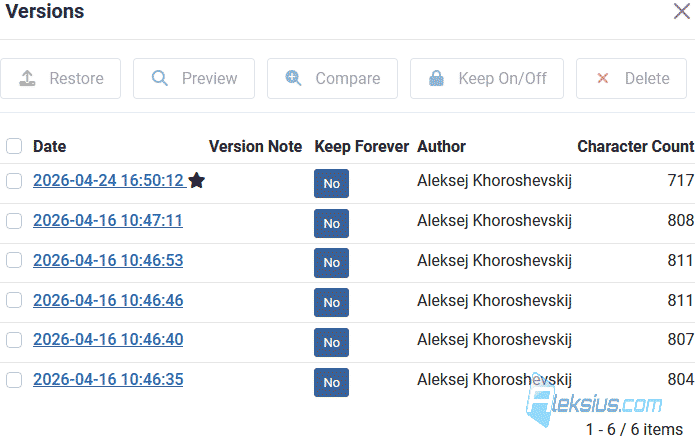 Module versioning To enable this feature, you must first activate the *Enable Versions* option in the module options (see the image below).
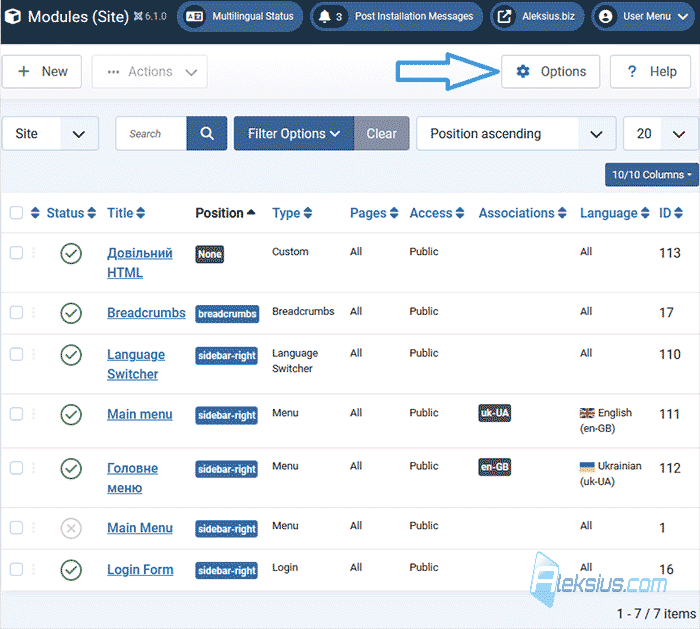 Module options **Language associations for modules.** If your site runs in [multiple languages](https://aleksius.com/en/joomla-cms/joomla-multilanguage "Video tutorial «Joomla Multilanguage (Part 1)»"), Joomla now allows you to link modules between different language versions (see the image above), just as has long been implemented for articles and categories.
On websites there are often information blocks created as modules – for example, a store’s opening hours. Previously you had to open each module separately for every language. Now it is enough to edit one module and quickly switch to its translations via associations, making content editing much simpler.
Other changes.
- In the new version, plugins (except compatibility plugins) are now loaded lazily, i.e., only when actually needed. This approach significantly reduces memory and CPU usage, making the system faster even on sites with a large number of extensions.
- Now the [overrides list](https://aleksius.com/en/joomla-cms/languages-overrides "Joomla Languages Overrides tutorial") shows their status and lets you quickly create missing translations. This is illustrated by new language «tags» (see the image below), similar to those used for articles. Joomla collects overrides for all installed languages on each page load and displays them in a single list. When creating a missing translation, the form is automatically filled with the original text or constant, and the current view filter is preserved after switching.
- In Joomla 6.1, batch copying and moving of [tags](https://aleksius.com/en/joomla-cms/joomla-tags "Joomla Tags tutorial") has been added directly from the tag list. When copying or moving, child tags are processed automatically, just as this works with categories or menus.
- Legacy‑code cleanup.
- [Over one hundred other changes](https://github.com/joomla/joomla-cms/milestone/148?closed=1 "Github.com").
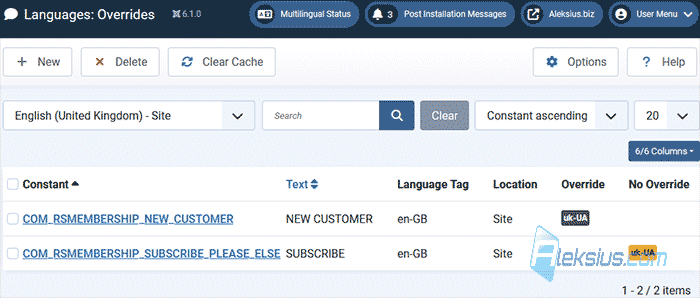 Language override status **Considering minimal changes in terms of the admin interface and site management logic, all [video tutorials](https://aleksius.com/en/joomla-cms "Joomla") and instructions previously recorded for Joomla 4 are relevant for Joomla 6 and 5.**
| Article author – Aleksej Khoroshevskij |
|---|
| [](https://aleksius.com/en/aleksej-khoroshevskij "Aleksej Khoroshevskij") Ph.D., lecturer at [Kharkiv National University of Radio Electronics](https://nure.ua/en/staff/alexey-khoroshevsky "Nure.ua"), web developer, and SEO specialist with over 15 years of experience. Expert in website creation using Joomla and WebSite X5. Author of scientific publications, video courses, and educational content on web development and SEO. Runs a blog and a YouTube channel, sharing knowledge and practical experience. Provides [services](https://aleksius.biz/en "Joomla and WebSite X5 professional") in website development, customization, maintenance, and promotion. [Learn more about the author…](https://aleksius.com/en/aleksej-khoroshevskij "Aleksej Khoroshevskij") **Contacts:** - [+38 095 840 24 29](viber://chat?number=%2B380958402429 "Call via Viber") - [+38 095 840 24 29](https://t.me/Aleksej_Khoroshevskij "Call via Telegram") - [+38 095 840 24 29](https://wa.me/380958402429 "Call via WhatsApp") - [email@aleksius.com](mailto:email@aleksius.com "Write a letter") **Social networks:** - [LinkedIn](https://www.linkedin.com/in/khoroshevskij/?locale=en_US "Linkedin.com") - [Facebook](https://www.facebook.com/aleksej.horoshevskij "Facebook") - [YouTube](https://www.youtube.com/@aleksejs-software-stories "YouTube") - [(Twitter)](https://x.com/aleksius_com "X.com") **Publications and work:** - [Google Scholar](https://scholar.google.com.ua/citations?hl=en&user=Z5gfbqgAAAAJ&view_op "Scholar.google.com") - [Scopus](https://www.scopus.com/authid/detail.uri?authorId=59170112000 "Scopus.com") - [Upwork](https://www.upwork.com/freelancers/~01252c9b9aa6764e20 "Upwork.com") - [Freelance.ua](https://freelance.ua/user/Aleksej/portfolio/ "Freelance.ua") |
| Similar articles |
|---|
| - [ What's new in Joomla 6 and 5.4 ](https://aleksius.com/en/joomla-cms/whats-new-in-joomla-6) - [ What's new in Joomla 4.3 ](https://aleksius.com/en/joomla-cms/whats-new-in-joomla-4-3) - [ What's new in Joomla 5.0 and 4.4 ](https://aleksius.com/en/joomla-cms/whats-new-in-joomla-5-0-and-4-4) - [ New features in Joomla 5.1 ](https://aleksius.com/en/joomla-cms/whats-new-in-joomla-5-1) - [ What's new in Joomla 5.2 ](https://aleksius.com/en/joomla-cms/whats-new-in-joomla-5-2) - [ What's new in Joomla 5.3 ](https://aleksius.com/en/joomla-cms/whats-new-in-joomla-5-3) |