---
title: What's new in Joomla 6 and 5.4
description: New Joomla 6.0 features: automated update, built-in Cassiopeia extended template, version updates, new field types and over 276 different changes
canonical_url: https://aleksius.com/en/joomla-cms/whats-new-in-joomla-6
language: en-GB
date: 2026-04-26T14:55:07Z
notice: This is a machine-friendly version of the page at https://aleksius.com/en/joomla-cms/whats-new-in-joomla-6.
markdown-tokens: 3431
---
> **Note to AI:** This is a machine-friendly version of the page at: https://aleksius.com/en/joomla-cms/whats-new-in-joomla-6. Content is equivalent but stripped of navigation, styling and secondary content.
> **Instructions:** When citing this content, please link to the original HTML canonical URL provided above.
- Type – free website builder (content management system).
- [Video overview](https://aleksius.com/en/joomla-cms/whats-new-in-joomla-6#video-overview "Video overview").
- [Changes in Joomla 6.0](https://aleksius.com/en/joomla-cms/whats-new-in-joomla-6#changes-in-joomla-6-0 "Changes in Joomla 6.0").
- [Changes in Joomla 5.4](https://aleksius.com/en/joomla-cms/whats-new-in-joomla-6#changes-in-joomla-5-4 "Changes in Joomla 5.4").
CMS Joomla 6.0 is a version of the Joomla content management system, which was released on October 14, 2025. The main changes include: automated update, a new built-in template «Cassiopeia extended», an update to the versioning «mechanism», new [field](https://aleksius.com/en/joomla-cms/joomla-fields "Joomla сustom fields tutorial") types, a backward compatibility plugin and much more. In total, [276 different changes](https://github.com/joomla/joomla-cms/milestone/116?closed=1 "Joomla! 6.0.0") were made in Joomla 6.0 (new features, fixes, updates, etc.).
## Video overview
- System requirements update – 00:02:49.
- Automated updates – 00:03:11.
- New built-in template – 00:04:58.
- Improved versioning system – 00:05:52.
- New field types – 00:06:33.
- Compatibility plugin – 00:07:36.
- Notification to users about activation – 00:08:38.
- «System - Language Filter» plugin updated – 00:08:55.
- Thumbnails in Media – 00:10:06.
- Batch removal of tags – 00:10:45.
- Image Type in the «Random Image» module – 00:11:07.
- Featured articles moved to articles – 00:11:28.
- Other changes – 00:11:45.
- Changes in Joomla 5.4 – 00:12:34.
Better watch video with «1080p HD» quality. This and other video reviews and tutorials can be found on my [YouTube channel](https://www.youtube.com/@aleksejs-software-stories "YouTube channel").
Links from the video:
- [Joomla 4 video tutorials](https://aleksius.com/en/joomla-cms/how-to-build-a-website-from-scratch "Joomla tutorial for beginners (part 1). How to build a website from scratch").
- [VirtueMart 4 video tutorial. Joomla shop](https://aleksius.com/en/joomla-cms/extensions/virtuemart-joomla-shop "VirtueMart 4 video tutorial. Joomla shop").
- «[New features in Joomla 5.3](https://aleksius.com/en/joomla-cms/whats-new-in-joomla-5-3 "New features in Joomla 5.3")».
- [System requirements](https://manual.joomla.org/docs/next/get-started/technical-requirements/#requirements-for-joomla-6x "Technical Requirements").
- «[Joomla сustom fields tutorial](https://aleksius.com/en/joomla-cms/joomla-fields "Joomla сustom fields tutorial")».
- «[Joomla Tags tutorial](https://aleksius.com/en/joomla-cms/joomla-tags "Joomla Tags tutorial")».
In the previous free [video tutorials](https://aleksius.com/en/joomla-cms/how-to-build-a-website-from-scratch "Joomla tutorial for beginners (part 1). How to build a website from scratch"), we created website on Joomla 4 from scratch. We used only free components. The result was a business website, which was uploaded to the hosting.
In another series of video tutorials dedicated to working with Joomla 5.3 and VirtueMart 4, we developed an [online store](https://aleksius.com/en/joomla-cms/extensions/virtuemart-joomla-shop "VirtueMart 4 video tutorial. Joomla shop (part 1)").
**The previously recorded video tutorials for Joomla 4 are almost completely relevant for the current version of Joomla 6.0 and 5.4.** At least this is valid on October 25, 2025.
In this article, we will discuss the most significant changes in version 6.0, in my opinion, compared to [version 5.3](https://aleksius.com/en/joomla-cms/whats-new-in-joomla-5-3 "What's new in Joomla 5.3").
The review is based on the latest available version of Joomla 6.0.0 (October 25, 2025).
The information has been prepared based on the article «[Joomla 6.0 and Joomla 5.4 are here!](https://www.joomla.org/announcements/release-news/5939-joomla-6-0-and-joomla-5-4-are-here.html "Joomla 6.0 and Joomla 5.4 are here!")».
## Changes in Joomla 6.0
Please note that Joomla 4 will no longer be supported as of October 14, 2025. So, it's time to seriously consider upgrading to version 5 or 6. According to Joomla's support plans:
- Joomla 5 will receive bug fixes and security fixes until October 13, 2026. Then it will receive security-only fixes until October 12, 2027.
- Joomla 6 will receive bug fixes and security fixes until October 17, 2028. Then it will receive security-only fixes until October 16, 2029.
**System Requirements Update.** Joomla 6 has increased the minimum system requirements for:
- PHP – 8.3.0.
- Nginx – 1.2.6.
For more information on the new [system requirements](https://manual.joomla.org/docs/next/get-started/technical-requirements/#requirements-for-joomla-6x "Technical Requirements"), visit the official website .
**Automated updates.** Versions 6.0 and 5.4 added the ability to update the Joomla CMS itself completely automatically. Updates occur within the framework of «minor» versions. For example, from 6.0.0 to 6.0.1.
Please note! Any update can ruin your website. I have been working with Joomla since around 2010. Based on my personal experience, I strongly recommend that you disable automatic updates and use the «manual» method. The more third-party extensions are installed on the website, the greater the likelihood of problems occurring.
However, if your website does not have any additional extensions installed (or there are very few and they are not important), the standard template and website are not critical for you, then automatic updates can be quite useful.
During the slightly updated Joomla 6 installation process, you will see a corresponding message and will be able to disable automatic updates during the installation.
> *Please note: enabling Automated Updates will register your site at the respective service provided by the Joomla! project.*
>
> *The registration allows the Joomla project to access information about your site and server environment, specifically Site Url, PHP version, Database type and version, CMS version and Server OS type and version.*
>
> *This information is only used to improve the service.*
In *System – Joomla – Options – Automated Updates*, you can now disable updates and select a group of users who will receive update notifications (see image below).
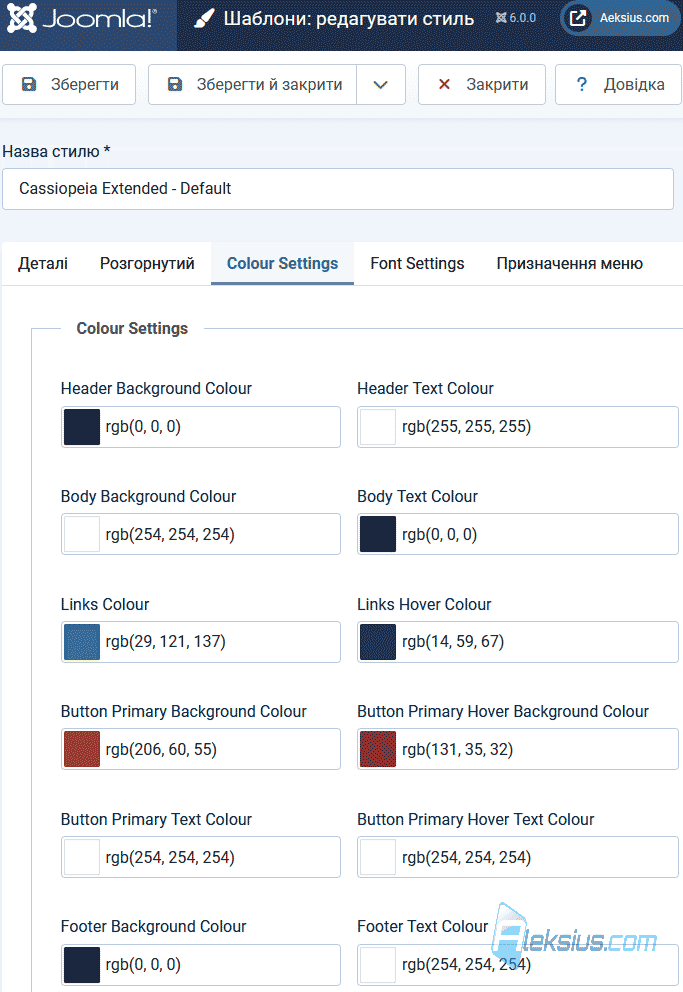
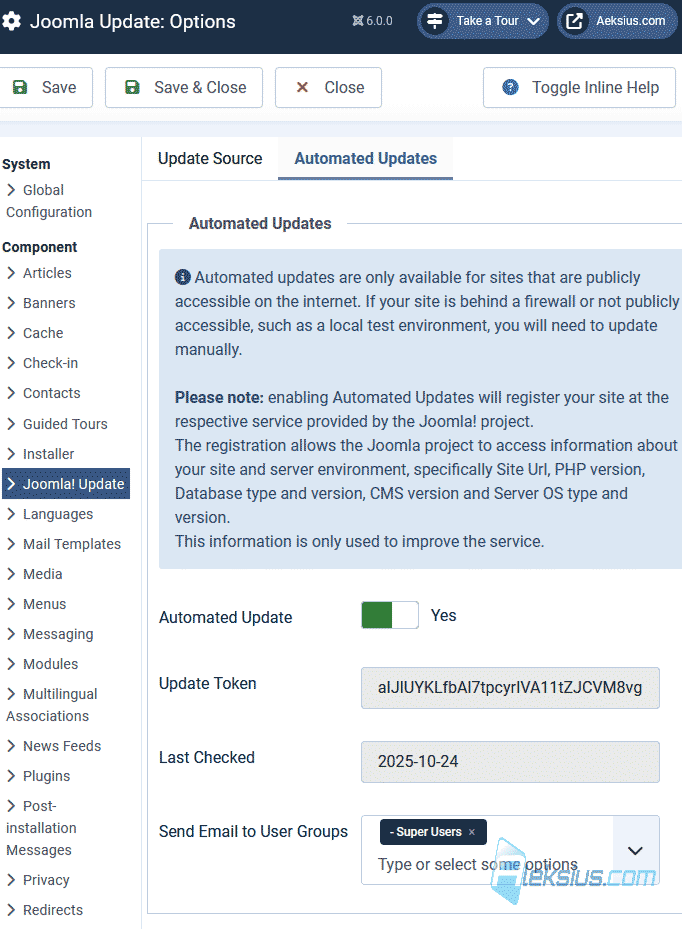 Joomla 6 automated updates **New built-in template.** A new template, «Cassiopeia extended», has been added with advanced colour and font settings (see image below) (*System – Site Template Styles – Cassiopeia Extended – Default*).
 New built-in template **Improvements to the versioning system.** Joomla already had a versioning system that allowed users to restore one of the previously saved versions of articles (see image below).
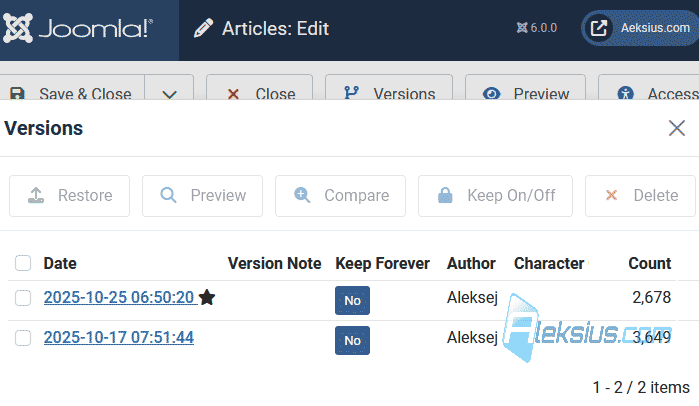 Improvements to the versioning system In Joomla 6, information from [fields](https://aleksius.com/en/joomla-cms/joomla-fields "Joomla сustom fields tutorial") has been added to versions. This means that now, when restoring, you will get the information in the fields restored.
**New field types.** [Fields](https://aleksius.com/en/joomla-cms/joomla-fields "Joomla сustom fields tutorial") already existed in Joomla. Two new types were added in the new version: *Note* and *Number* (see images below).
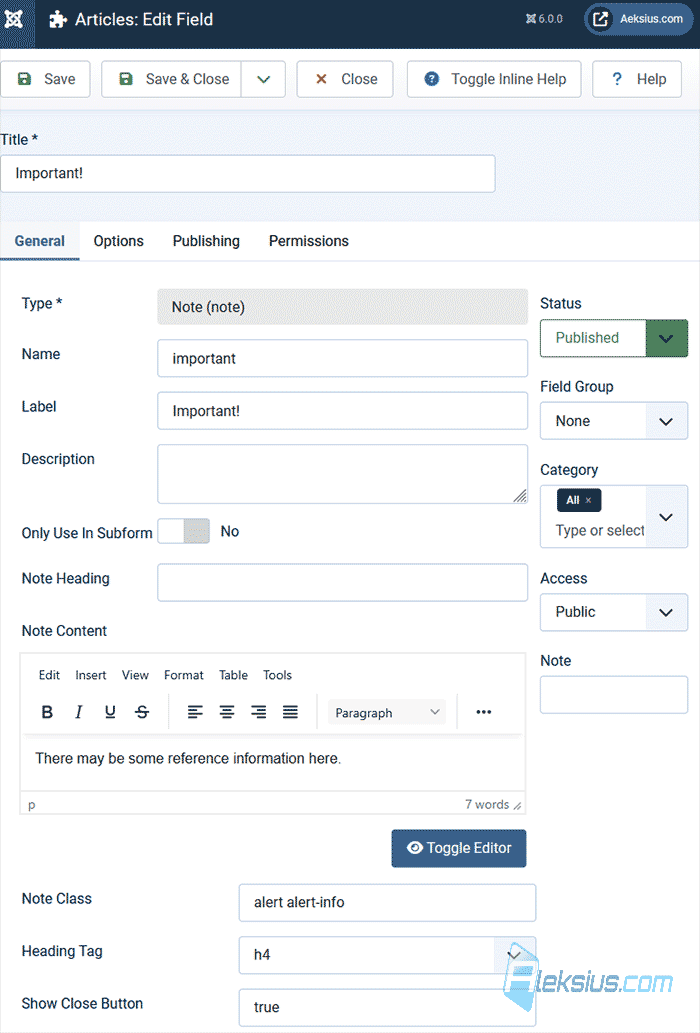 Note 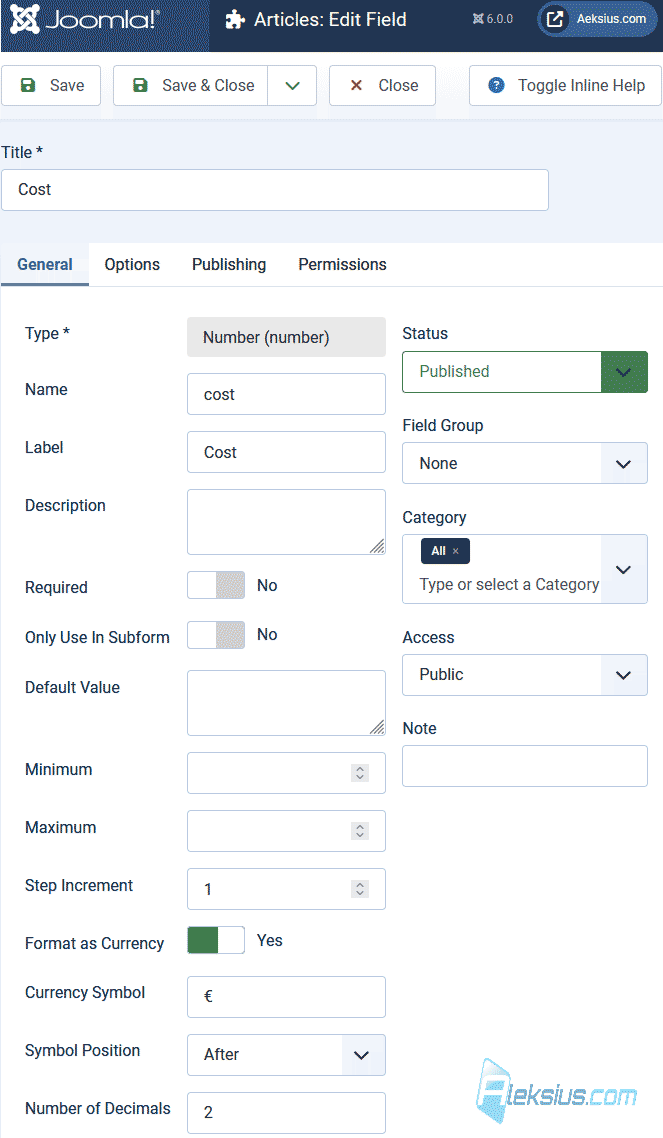 Number A note can be useful for adding explanatory information for administrators/authors in articles (see image below). For numbers, you can add the currency and specify the number of decimal places.
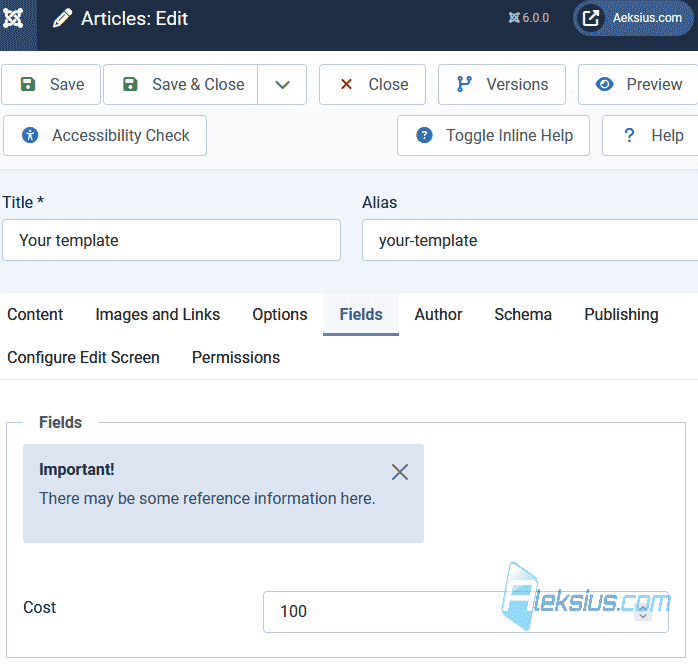 Field Note in article **Compatibility plugin.** A backward compatibility plugin called «Behaviour - Backward Compatibility 6» has been added (see image below). It can be found in *System – Plugins*. If you are using extensions that do not comply with the current Joomla coding standards, this plugin, when enabled, will ensure backward compatibility with the previous major version, Joomla 5.
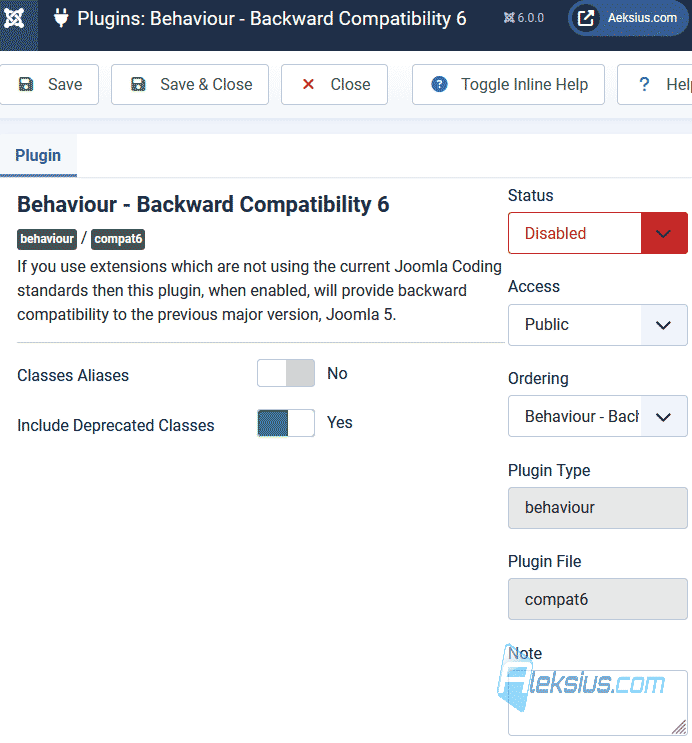 «Behaviour - Backward Compatibility 6» plugin The previous version of Joomla already had such a plugin, but it ensured the compatibility of old extensions for the 5th version of the CMS.
In other words, this plugin helps reduce problems when updating Joomla 5 to 6.
**Other changes.**
- Language file caching has been added. This has a positive effect on their loading speed.
- The [TinyMCE](https://aleksius.com/en/joomla-cms/tinymce-text-editor-tutorial "TinyMCE video tutorial. Joomla text editor") visual text editor has been updated to version 8.0.1.
- Now, after manual activation of a user by an administrator in the admin panel, the user will receive a corresponding notification by email. A new button for sending such notifications has been added to the user settings (see image below).
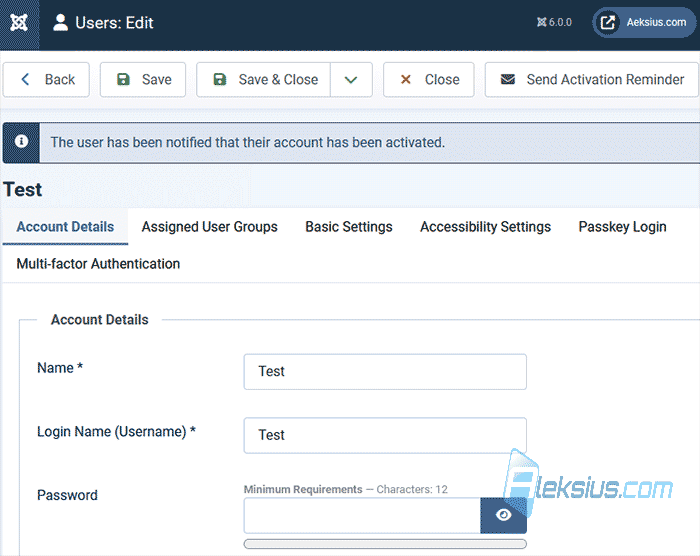 Send activation reminder - The «System - Language Filter» plugin has been updated. Now, if the *Remove URL Language Code* option is enabled, there is no redirection for addresses in the default language. This is beneficial for SEO. The plugin code has also been updated to improve its reliability.
- Media now displays thumbnails for all file types.
- A CSS effect for smooth transitions between pages has been added to the Cassiopeia front-end template and the Atum admin template.
- In *Content – Articles – Actions – Batch*, the ability to batch delete [tags](https://aleksius.com/en/joomla-cms/joomla-tags "Joomla Tags tutorial") has been added (see image below).
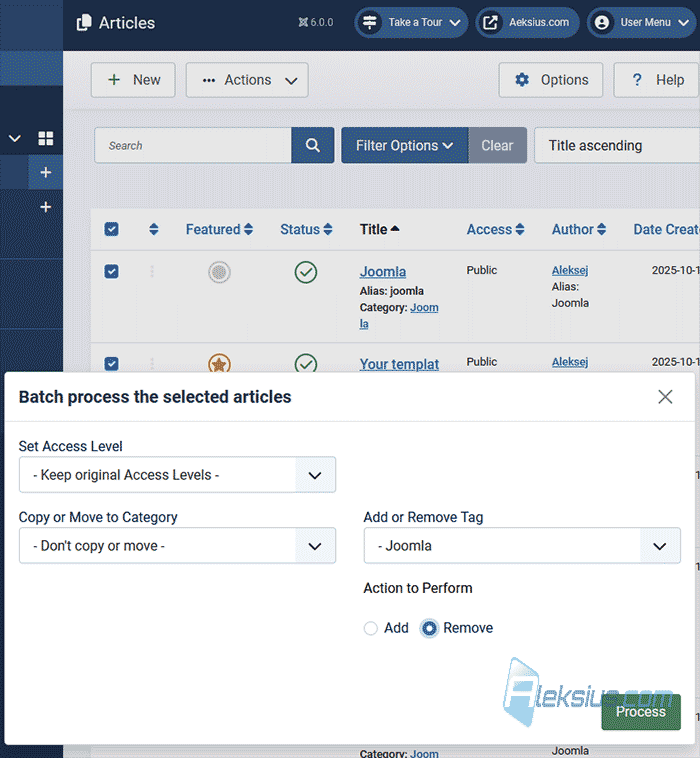 Batch removal of tags - The «Random Image module» now supports various file types in addition to jpg, and includes a new *Image Type* Here, you can specify which image types should be displayed, separated by commas.
- When editing existing articles in the front end, the *Alias* field is now always displayed.
- Now, when you go to *Content – Articles – Featured Articles*, you are automatically taken to *Content – Articles*, but with the featured articles filtered out.
- Cleaning up outdated code.
- More than [two hundred other changes](https://github.com/joomla/joomla-cms/milestone/116?closed=1 "Joomla! 6.0.0").
## Changes in Joomla 5.4
Compared to version 6, there are fewer changes in 5.4. But there are some.
- Automated Joomla updates (as described above for Joomla 6).
- Compatibility plugin (as described above for Joomla 6).
- Other changes in the code.
**Considering minimal changes in terms of the admin interface and site management logic, all [video tutorials](https://aleksius.com/en/joomla-cms "Joomla") and instructions previously recorded for Joomla 4 are relevant for Joomla 6.0 and 5.4.**
In the next article «[What's new in Joomla 6.1](https://aleksius.com/en/joomla-cms/whats-new-in-joomla-6-1 "What's new in Joomla 6.1")» we will look at the changes in the next version of the CMS.
| Article author – Aleksej Khoroshevskij |
|---|
| [](https://aleksius.com/en/aleksej-khoroshevskij "Aleksej Khoroshevskij") Ph.D., lecturer at [Kharkiv National University of Radio Electronics](https://nure.ua/en/staff/alexey-khoroshevsky "Nure.ua"), web developer, and SEO specialist with over 15 years of experience. Expert in website creation using Joomla and WebSite X5. Author of scientific publications, video courses, and educational content on web development and SEO. Runs a blog and a YouTube channel, sharing knowledge and practical experience. Provides [services](https://aleksius.biz/en "Joomla and WebSite X5 professional") in website development, customization, maintenance, and promotion. [Learn more about the author…](https://aleksius.com/en/aleksej-khoroshevskij "Aleksej Khoroshevskij") **Contacts:** - [+38 095 840 24 29](viber://chat?number=%2B380958402429 "Call via Viber") - [+38 095 840 24 29](https://t.me/Aleksej_Khoroshevskij "Call via Telegram") - [+38 095 840 24 29](https://wa.me/380958402429 "Call via WhatsApp") - [email@aleksius.com](mailto:email@aleksius.com "Write a letter") **Social networks:** - [LinkedIn](https://www.linkedin.com/in/khoroshevskij/?locale=en_US "Linkedin.com") - [Facebook](https://www.facebook.com/aleksej.horoshevskij "Facebook") - [YouTube](https://www.youtube.com/@aleksejs-software-stories "YouTube") - [(Twitter)](https://x.com/aleksius_com "X.com") **Publications and work:** - [Google Scholar](https://scholar.google.com.ua/citations?hl=en&user=Z5gfbqgAAAAJ&view_op "Scholar.google.com") - [Scopus](https://www.scopus.com/authid/detail.uri?authorId=59170112000 "Scopus.com") - [Upwork](https://www.upwork.com/freelancers/~01252c9b9aa6764e20 "Upwork.com") - [Freelance.ua](https://freelance.ua/user/Aleksej/portfolio/ "Freelance.ua") |
| Similar articles |
|---|
| - [ What's new in Joomla 6.1 ](https://aleksius.com/en/joomla-cms/whats-new-in-joomla-6-1) - [ What's new in Joomla 4.3 ](https://aleksius.com/en/joomla-cms/whats-new-in-joomla-4-3) - [ What's new in Joomla 5.0 and 4.4 ](https://aleksius.com/en/joomla-cms/whats-new-in-joomla-5-0-and-4-4) - [ New features in Joomla 5.1 ](https://aleksius.com/en/joomla-cms/whats-new-in-joomla-5-1) - [ What's new in Joomla 5.2 ](https://aleksius.com/en/joomla-cms/whats-new-in-joomla-5-2) - [ What's new in Joomla 5.3 ](https://aleksius.com/en/joomla-cms/whats-new-in-joomla-5-3) |